Thursday, July 13, 2017


Wednesday, May 10, 2017
Is SQL Server first RDBMS with built-in AI
My question will be how that can be possible ? Can adding support for Python and naming the service as SQL Server machine learning services make it the first RDBMS with built-in Artificial intelligence? I thought AI is a broader field than adding Python support. Am I missing something here ?That will make me experiment with this release more
Tuesday, May 09, 2017
SQL Server 2017 New Feature (my pick)
The following are few of the many features that SQL server 2017 introduced or improved. The list is not exhaustive list but the one I thought was interesting.
Adaptive Query Plans
Analytics changes
One of the major feature of SQL server 2016 was integration of R services into SQL server database engine. SQL server 2017 takes step further and enhanced the analytics by adding support for Python as the second language. As you all know Python is a powerful language and widely used by data scientists, analysts, developers and statisticians. It can leverage external statistical packages to perform data manipulation and statistical analysis within a T-SQL environment now. The service is now renamed from SQL server R services to SQL server Machine learning services.
Changes to Cloud
Database as a service offering from Microsoft was lacking some compatibility as compared to on-premise or in an Azure VM version of SQL server such as cross database query and many more. The new solution to the problem is a new offering that combines platform as a service (PaaS) and infrastructure as a service (IaaS). This solution now supports cross database query and is a wonderful for Independent software vendors to migrate their solutions and I think is a smart move by Microsoft to enhance this feature.
Introduction of Graph database within core database engine
Graph databases are overlooked in many ways. But it should be looked as the next generation of relational databases. In graph database resulting data models are much simpler and at the same time more expressive. I am not going into detail of what a graph database and how it is structured however adding support for graphical database within SQL server database engine is remarkable but as always we need to give it some time before it mature. But, that doesn’t stop being excited about this feature. Graph databases are normally well suited for mining data from social media and complex relationship. I cannot wait to play with this added functionality.
Adaptive Query Plans
This is very interesting. As we all know Microsoft introduced a concept of Query store feature in SQL Server 2016. Query store is integrated in SQL server 2016 and can capture query runtime information. Before query store was introduced we use plan cache to review and analyse execution plan. However, a restart of SQL server will wipe out all plan cache. Hence Microsoft introduced Query Store. But, Adaptive query plan takes this functionality further. With Adaptive query optimization in SQL server 2017, SQL server can evaluate the runtime of a query and compare with the current execution to the query that was performed in previous runs. If it finds a better plan, it can improve the execution plan for the next run. However this change will be incremental and conservative. Looks like in the future with the AIs help, the task of performance tuning can be handled by the system itself. I think, the DBA’s need to watch this space and learn a lot. I am sure, as we know this feature will get better over time.
One of the major feature of SQL server 2016 was integration of R services into SQL server database engine. SQL server 2017 takes step further and enhanced the analytics by adding support for Python as the second language. As you all know Python is a powerful language and widely used by data scientists, analysts, developers and statisticians. It can leverage external statistical packages to perform data manipulation and statistical analysis within a T-SQL environment now. The service is now renamed from SQL server R services to SQL server Machine learning services.
Database as a service offering from Microsoft was lacking some compatibility as compared to on-premise or in an Azure VM version of SQL server such as cross database query and many more. The new solution to the problem is a new offering that combines platform as a service (PaaS) and infrastructure as a service (IaaS). This solution now supports cross database query and is a wonderful for Independent software vendors to migrate their solutions and I think is a smart move by Microsoft to enhance this feature.
Resumable online index rebuild
Another feature that caught my attention is resumable online index rebuild. How many times we are caught with starting a large table index rebuild and not able to complete? I would say many DBA’s came across plenty of times. This new feature allows you to resume an online index rebuild operation where it is stopped after a failure. It will allow you to pause and later resume the operation too. I will definitely look at this feature and investigate if I can use it as soon as I upgraded to SQL 2017
And many more --
* Tempdb Setup Improvements
* Improved Backup performance for small databases on high end servers
* DBCC CLONEDATABASE Improvements
* SQL Server agent support for Linux
* SQL Server agent support for Linux
The list goes on ...
Tuesday, March 07, 2017
Red-gate launched new product (SQL-Clone)
Could this be the solution for the problem we were facing of replicating production database into different environments(dev/test/reg/uat and etc) without using expensive tools. You can try it yourself by downloading 15 day trail version from red-gate. I tried when it was beta version but the slick interface that is out now is much better.
Thursday, December 01, 2016
Gartner Magic Quadrant for operational database management systems (2016)
Microsoft has come so far in the last 15 years from being the under dogs to become the market leaders in database market. As of October 2016 Microsoft is the leaders in Gartner Magic Quadrant for operational database management system. Any area mostly reserved for the likes of Oracle, SAP and IBM.


Thursday, November 17, 2016
Saturday, July 02, 2016
SQL Server Management Studio – July 2016 Release
The first monthly update release of SSMS following the release of SQL Server 2016 is now available. The update added the feature I personally was waiting for. The following are few of the highlights that was mentioned during the announcement.
and some bug fixes too. I cannot wait to play with Azure SQL Data Warehouse using the new SSMS release
- Support for Azure SQL Data Warehouse in SSMS. This is good news indeed.
- Support for PowerShell script generation in the Always Encrypted wizard
- Improved connection times to Azure SQL databases
- New ‘Backup to URL’ dialog to support the creation of Azure storage credentials for SQL Server 2016 database backups
- New Restore dialog to streamline restoring a SQL Server 2016 database backup from the Microsoft Azure storage service.
and some bug fixes too. I cannot wait to play with Azure SQL Data Warehouse using the new SSMS release
Monday, June 13, 2016
New Sample databases for SQL 2016
SQL 2016 is in market for just under two weeks and Microsoft released a new sample databases(WideWorldImporters and WideWorldImportersDW) Those sample database can be used to evaluate the new features of SQL 2016 such as
• Polybase
• Query store
• In-Meomory OLTP
• Updatable column store index (both clustered and non-clustered)
• Native JSON support
• Security (Dynamic data masking, row level security and Always encrypted)
• Temporal database and tables
There are also few scripts and applicaiton that was released with new sample databases to test out the new features. Enjoy
• Polybase
• Query store
• In-Meomory OLTP
• Updatable column store index (both clustered and non-clustered)
• Native JSON support
• Security (Dynamic data masking, row level security and Always encrypted)
• Temporal database and tables
There are also few scripts and applicaiton that was released with new sample databases to test out the new features. Enjoy
Monday, June 06, 2016
Azure SQL Data Warehouse
Azure SQL
Data Warehouse is the new SaaS offering from Microsoft. It is still in preview
state and I had a chance to set up and play with it. It looks very promising.
So, what
is Azure SQL Data Warehouse? Microsoft defines Azure SQL Data warehouse as
follows: “Azure
SQL Data Warehouse is a cloud-based, scale-out database capable of processing
massive volumes of data - both relational and non-relational. Built on
massively parallel processing (MPP) architecture, SQL Data Warehouse can handle
your enterprise workload”.
FlyData [1] that compares Azure data warehouse vs Amazon Redshift defined
it as “a distributed and enterprise level database capable of handling large
amounts of relational and non-relational data”
Historically,
those type of MPP are only available for enterprises that can afford to fork
out a lot of money to buy appliance upfront. I believe what Microsoft done is
great in trying to bring this powerful massively parallel processing
architecture to all of us and now we are in position to investigate, experiment
and perform cost benefit analysis and see if it can benefit the business under
our domain. I believe the SaaS offering of the product will not discriminate
against any size of companies whether small, medium or large. It is also a
great opportunity for data scientists to experiment their modelling and avoid
hassle of initial investment cost. Whether this will be a game
changer, we won’t say it for sure now but time will tell.
The
abstraction and separation of compute from azure data warehouse is the one I
personally like very much. I believe the flexibility to dynamically
deploy, grow, shrink and pause is indeed another feature. In this
article, I will look at two aspects of the product; architecture and pricing
Architecture
There are
four layer that defines azure data warehouse. There are disagreement if
it is four or three or even two layers that defines Azure data warehouse
architecture. I wouldn't be drawn into the layering as they all talk
about the same thing. Those layers are DMS, storage, control and compute
nodes. The image below (source: Microsoft) gives you a visual
architecture of Azure data warehouse
- Data Movement services is one of the layer
that spans across both control node and compute nodes. It is a windows
service that coordinates and/or manages data movement between different
nodes.
- Control node is the entry point for all
applications. It is like connecting to an instance of SQL server. The
application that connects to ADW (Azure data warehouse) doesn’t know the
underlying compute nodes nor will be able to connect to any of the compute
nodes. The compute nodes are abstracted from our application. The control
node is responsible in distributing our requests to underlying compute
nodes
- Compute nodes are the engine of our computing
power hence called compute nodes. When you issue a big query the first
node you hit will be control node which will then distribute the query to
compute node. Once the query run on compute nodes it is then the work of
control nodes that will aggregate the results from all the compute node
and return’s to our application.
- One of the great achievements of Azure data
warehouse is the separation of dependence of storage layer from the
compute node when scaling up. You should be able to increase your storage
independent of your compute node. The storage layer and compute
nodes scales separately. The data will be stored in Azure Blob storage.
The compute nodes are directly interacting with the storage layer when
reading or writing data.

Image
source: https://azure.microsoft.com/en-gb/documentation/articles/sql-data-warehouse-overview-what-is/
Charging
Charging
is based on number of DWU. DWU (data warehouse unit) represents the amount of
compute resources used at any given time. The more DWU you use, the
faster your query runs as it will be executed on more distributed CPU and
memory. It will take some time and experience to understand the trade-off
and/or optimum DWU to pricing to run your query to be completed within the
time-frame you planned or anticipated.
As
per information I have got at current time, the charge is per minute. For
instance, if you used 100 DWU for 30 minute you will be charged for 30 minutes
instead of per hour pricing that is shown for compute capabilities. Currently,
the minimum DWU you can configure from the portal is 100 DWU (with a cost of
£0.43/hour) with increment of 100 up to a maximum of 2000 DWU (with a cost of
£8.55/hour). If you pause you will not be charged.
References
- https://azure.microsoft.com/en-gb/services/sql-data-warehouse/
- (https://azure.microsoft.com/en-gb/documentation/articles/sql-data-warehouse-get-started-provision/
- https://www.simple-talk.com/cloud/cloud-data/azure-sql-data-warehouse/
Thursday, May 05, 2016
SQL Server 2016 general availability
It is now official that SQL Server 2016 will be out on 1st of June 2016. As some of you may know Microsoft dropped the BI edition in it's 2016 release. Looks like there is now Enterprise, Standard, Express and Developer Edition. SQL Server developer edition is now a free edition providing the full feature set of SQL server Enterprise and can be used only for development and testing.
Friday, March 11, 2016
Microsoft SQL Server Announcement
- Microsoft has indicated that support for SQL Server 2005 will end as of April 12th, 2016.
·
No access to critical security updates, opening the
potential for business interruptions
·
Higher maintenance costs for maintaining legacy
servers, firewalls, intrusion systems mean increased costs for the business
·
Compliance concerns – as support ends, organizations
will likely fail to meet regulatory standards compliance
- With the introduction of SQL Server 2016, Microsoft will no longer offer the Business Intelligence edition. Beyond this change, they don’t anticipate any changes in the licensing model with the release of SQL Server 2016.
Wednesday, March 09, 2016
Tuesday, March 08, 2016
Tuesday, March 01, 2016
Instance wide script to add user (the 4th way)
My new script to add user to all databases in an instance published on http://www.sqlservercentral.com/ and can be found Instance wide script to add user (the 4th way). The script can be modified and can be used for various purpose.
Monday, February 15, 2016
SQL Server 2016 release date
Looking at the history of the last Microsoft releases, it looks like the release of SQL 2016 will be either March or April.. Hope my prediction is right:)
| SQL Server | Release_Date |
| SQL Server 2016 | 2016-04/03-?? |
| SQL Server 2014 | 01/04/2014 |
| SQL Server 2012 | 06/03/2012 |
| SQL Server 2008 R2 | 21/04/2010 |
| SQL Server 2008 | 2008-08-07 |
| SQL Server 2005 | 07/11/2005 |
Thursday, February 11, 2016
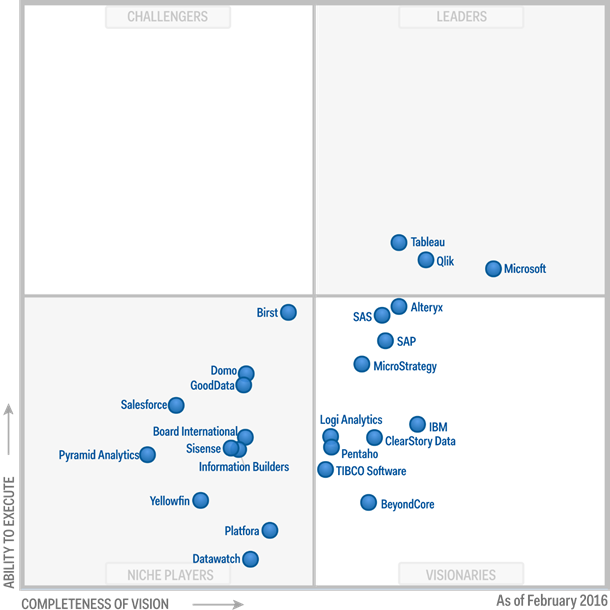
Gartner positions Microsoft as a leader in BI and Analytics Platforms
For the first time, Microsoft is placed furthest in vision within the Leaders quadrant.
Tuesday, December 29, 2015
sp_server_diagnostics
sp_server_diagnostics sp is used to capture quick diagnostic data and health information about your SQL Server to detect potential issues. It is a must run sp that I start using recently as a quick check on your SQL server stack. You can even run this procedure when using DAC. For more detailed info visit an article on www.mssqltips.com.
Tuesday, December 22, 2015
The new Community Tech Preview of SQL Server 2016, CTP3
I want to point out two features that is either added or improved with CTP3 release of SQL Server 2016.
New addition : You will now be able to setup transnational replication from in premise to Azure SQL (Microsoft's cloud based version of SQL Server). this will for sure make it easier to migrate data to cloud with little or no downtime
Improvement: Integration of R (Revolution Analytics) package that will allow you to run R analytics in the database without pulling out data for analysis on a separate location or machine. This preview also added the ability to execute R scripts via system stored procedure to query and pass data to R
New addition : You will now be able to setup transnational replication from in premise to Azure SQL (Microsoft's cloud based version of SQL Server). this will for sure make it easier to migrate data to cloud with little or no downtime
Improvement: Integration of R (Revolution Analytics) package that will allow you to run R analytics in the database without pulling out data for analysis on a separate location or machine. This preview also added the ability to execute R scripts via system stored procedure to query and pass data to R
Wednesday, December 16, 2015
Azure data warehouse architecture

Diagram source : https://azure.microsoft.com/en-gb/documentation/articles/sql-data-warehouse-overview-what-is/
Azure SQL Data Warehouse is a distributed database capable of processing big data (both relational and non-relational). Microsoft claims that it is the first cloud based data warehouse that combines SQL capabilities with scalability at its core.
Subscribe to:
Posts (Atom)