Wednesday, March 19, 2014


Friday, January 17, 2014
SQL Server 2014 release date?
The exact date of release is still not set but insider from Microsoft thinks it will be released in the first half of 2014. or 3rd Quarter of 2014. Played with CP2 and looks pretty good. Waiting to play with when it is released. As usual, I will wait till SP1 is released before moving any production probably early next year
Wednesday, August 28, 2013
SQL 2014 new feature (Updatable columnstore)
One of the new features introduced on SQL server 2012 was a memory optimized columnstore index. This feature not only reduces the amount of storage but also the speed of the query. During my test, I found that the speed of a query performance before and after columnstore index was in magnitude of 15 times faster. Wow, that was very impressive. As being new feature it have its own drawbacks. You are not able to update the data, hum. The workaround was very cumbersome and not suitable for some of data warehouse solutions. If you want to update data you need to drop the columnstore index update the data and recreate it.
If you have already upgraded to 2012 to make use of the columnstore index then you may have to upgrade to the new SQL server 2014. SQL 2014 doesn’t require the workaround of updating data. The new release enhanced the columnstore to be a pure columnar store. Bang on!!
Data warehouse is much happier place to be with SQL 2014. Not only you will be able to save space but also increase query performance.
If you have already upgraded to 2012 to make use of the columnstore index then you may have to upgrade to the new SQL server 2014. SQL 2014 doesn’t require the workaround of updating data. The new release enhanced the columnstore to be a pure columnar store. Bang on!!
Data warehouse is much happier place to be with SQL 2014. Not only you will be able to save space but also increase query performance.
Thursday, August 22, 2013
When is SQL server installed
I have been asked may times how to find when a SQL server is installed. Mostly I told them to find the installation log. But, what I didn't realized is that you can find out by querying sys.syslogin database.To my surprise, quiet an easy statement. You can use
SELECT createdate as Sql_Server_Install_Date, *
FROM sys.syslogins
where sid = 0x010100000000000512000000
FROM sys.syslogins
where sid = 0x010100000000000512000000
or
SELECT createdate as Sql_Server_Install_Date
FROM sys.syslogins
where loginname = 'NT AUTHORITY\SYSTEM'
FROM sys.syslogins
where loginname = 'NT AUTHORITY\SYSTEM'
One of the above will do as long as default language is English
Flushing the cache for one database
DECLARE @DBID int
SET @DBID = ( SELECT dbid FROM master.dbo.sysdatabases WHERE name = 'db')
--Flush procedure on the db
DBCC FLUSHPROCINDB (@intDBID)
SET @DBID = ( SELECT dbid FROM master.dbo.sysdatabases WHERE name = 'db')
--Flush procedure on the db
DBCC FLUSHPROCINDB (@intDBID)
Friday, May 17, 2013
Execution plan puzzle
I recently come accross a query that used to run fine on production server but suddenly
Execution plans can be affected by different statistics, parallelism due to number of processors, the amount of available RAM in the server, different service packs, different server configuration settings, and the current load on the server. I imagine one or more of these are causing what you are seeing.
Friday, May 11, 2012
SQL server system table corruption
Recently I came across a sage database that has been corrupted. When running DBCC CHECKDB command I was getting the following errors:
There are 226 rows in 1 pages
for object "sys.sysprivs".
DBCC results for
'sys.sysschobjs'.
Msg 2511, Level 16, State 1,
Line 1
Table error: Object ID 34,
index ID 2, partition ID 562949955649536, alloc unit ID 562949955649536 (type
In-row data). Keys out of order on page (1:47), slots 66 and 67.
Msg 2511, Level 16, State 1,
Line 1
Table error: Object ID 34,
index ID 2, partition ID 562949955649536, alloc unit ID 562949955649536 (type
In-row data). Keys out of order on page (1:47), slots 72 and 73.
Msg 2511, Level 16, State 1,
Line 1
Table error: Object ID 34,
index ID 2, partition ID 562949955649536, alloc unit ID 562949955649536 (type
In-row data). Keys out of order on page (1:47), slots 93 and 94.
There are 4147 rows in 93
pages for object "sys.sysschobjs".
CHECKDB found 0 allocation
errors and 3 consistency errors in table 'sys.sysschobjs' (object ID 34).
Normally the re-indexing should have fixed this type of issue when the base table is user table but it didn't. To fix the issue I have to perform the following commands
use DatabaseName
go
ALTER DATABASE DatabaseName
SET SINGLE_USER
go
DBCC CHECKDB('DatabaseName', REPAIR_REBUILD)
go
The outcome from the above command was
Repair: The Nonclustered
index successfully rebuilt for the object "sys.sysschobjs, nc1" in
database "FCE_Sage".
Msg 8945, Level 16, State 1,
Line 1
Table error: Object ID 34,
index ID 2 will be rebuilt.
The error has been repaired.
Msg 2511, Level 16, State 1,
Line 1
Table error: Object ID 34,
index ID 2, partition ID 562949955649536, alloc unit ID 562949955649536 (type
In-row data). Keys out of order on page (1:47), slots 66 and 67.
The error has been repaired.
Msg 2511, Level 16, State 1,
Line 1
Table error: Object ID 34,
index ID 2, partition ID 562949955649536, alloc unit ID 562949955649536 (type
In-row data). Keys out of order on page (1:47), slots 72 and 73.
The error has been repaired.
Msg 2511, Level 16, State 1,
Line 1
Table error: Object ID 34,
index ID 2, partition ID 562949955649536, alloc unit ID 562949955649536 (type
In-row data). Keys out of order on page (1:47), slots 93 and 94.
The error has been repaired..
Tuesday, April 24, 2012
Latest version of SQL server
To get an idea of what the latest version of SQL server will be, you can ask a SQL guru @Ask SQL Guru
Cannot shrink tempdb
How to shrink tempDB
SELECT * FROM sys.dm_exec_requests WHERE database_id = 2
select * from sys.dm_tran_locks
where resource_database_id= 2
select * from sys.dm_db_session_space_usage
where user_objects_alloc_page_count<> 0
SELECT * FROM sys.all_objects
where is_ms_shipped = 0
DBCC FREEPROCCACHE
BCC SHRINKFILE ('tempdev', 1024)
Purge all data in database
Recently I have been tasked to purge all data in the database. When trying to delete data from tables which have foreign key relationship the standard purge routine will fail or you have to spend time to get which table to purge first. Also there is an issue of identity as when you delete data from the table the identity will not go back to starting point. After few research, I have got the best method which is shown below.
1. Disable all constraints in the database using the following command
exec sp_msforeachtable "ALTER TABLE ? nocheck contraint all"
2. Delete all data in the database
exec sp_MSForEachTable "DELETE FROM ?"
3. Enable all constraints
exec sp_msforeachtable "ALTER TABLE ? WITH CHECK CHECK CONSTRAINT all"
4. Reset tables with identity. Note when you run the following it will give you error if the table doesn't have identity column. Ignore the errors.
exec sp_MSforeachtable "DBCC CHECKIDENT ( '?', RESEED, 0)"
Friday, January 27, 2012
SQL server 2012 lauch date
New version of SQL server 2012 launch date is set for 7th of March. The offering will be in three main edition. Details of edition feature comparison can be found at Feature comparison
Enterprise Edition (EE) will be licensed based on compute capacity measured in cores
Business Intelligence (BI) Edition will be available in the Server + CAL model, based on users or devices
Standard Edition (SE) offers both licensing models to address basic database workloads
There will be Web Developer and Express versions but this is not detailed enough and we just have to wait and see.
SQL Server 2012 will continue to offer two licensing options one is based on
one based on computing power and the other is based on based on users or devices. The way the power is measured is not processor rather core based.
There will be Web Developer and Express versions but this is not detailed enough and we just have to wait and see.
SQL Server 2012 will continue to offer two licensing options one is based on
one based on computing power and the other is based on based on users or devices. The way the power is measured is not processor rather core based.
Friday, October 14, 2011
Partitioning an existing table and archiving part I
Recently, I have been tasked to come up with a solution to partition a table with clustered index. Previously, I have setup partition from scratch and was loading data to the new partition from non-partitioned table. When a table that you want partition have got a clustered index the job is much easier. I have followed the following steps to achieve my goal.
You don't need to do step 1 to 4 when the database and table/data exists. This is for demo and completeness purposes. You can directly jump to step 5
1.Create database
2. Create table
3. Populate sample data
4. Create Index on existing table
The idea is to move all the data that is created before 2009 as archive and the others as one year partition. Effectively
< 1 Jan 2009
Jan 1 2009 to 31 Dec 2009
Jan 1 2010 to 31 Dec 2010
>= Jan 1 2011
Which means we will have four partitions.
5. Create Filegroups and add file to each Filegroup. For demo purpose I added only one file per Filegroup. As you can see below I created four Filegroups. One Filegroup for each partition. But, you don't have to create four Filegroups. You can use only one Filegroup for all partition but it is better for maintenance purposes and if you want move one Filegroup to different spindle it make it much easier.
6. Create partition function and scheme
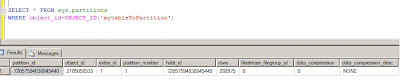
7. See current status of our table. Up to now our table is in a default partition. See figure below.
8. Move table to partition based on LastUpdated column of the table.
To perform this, I need to drop the index and recreate it on partition scheme that I have created above.
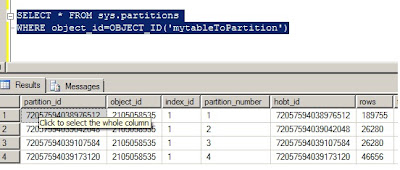
Just by creating my clustered index on partition scheme moved all the data in their respective partition. see result set below.
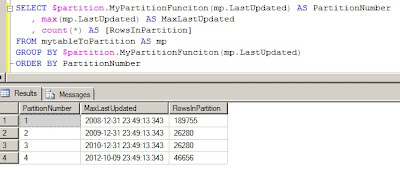
Let us now see where the our data has gone. The following query will show us the Maximum lastupdated value in particular partition, partition number and total number of rows in each partition. See the output result below.
In part II, I will show how easy it is to move archived data and able to delete without affecting performance of your system.
You don't need to do step 1 to 4 when the database and table/data exists. This is for demo and completeness purposes. You can directly jump to step 5
1.Create database
CREATE DATABASE MyPartitionDB
2. Create table
CREATE TABLE mytableToPartition(MyId INT IDENTITY(1,1), LastUpdated datetime)
3. Populate sample data
declare @timedate datetime
set @timedate = DATEADD(YEAR, -10, GETDATE())
while @timedate < '20121010'
begin
INSERT INTO mytableToPartition (LastUpdated)
values (@timedate)
set @timedate = DATEADD(MINUTE, 20, @timedate)
end
4. Create Index on existing table
CREATE clustered index CL_MyId on mytableToPartition(MyId)
The idea is to move all the data that is created before 2009 as archive and the others as one year partition. Effectively
< 1 Jan 2009
Jan 1 2009 to 31 Dec 2009
Jan 1 2010 to 31 Dec 2010
>= Jan 1 2011
Which means we will have four partitions.
5. Create Filegroups and add file to each Filegroup. For demo purpose I added only one file per Filegroup. As you can see below I created four Filegroups. One Filegroup for each partition. But, you don't have to create four Filegroups. You can use only one Filegroup for all partition but it is better for maintenance purposes and if you want move one Filegroup to different spindle it make it much easier.
ALTER DATABASE MyPartitionDB ADD FILEGROUP FG1;
ALTER DATABASE MyPartitionDB ADD FILEGROUP FG2;
ALTER DATABASE MyPartitionDB ADD FILEGROUP FG3;
ALTER DATABASE MyPartitionDB ADD FILEGROUP FG4;
-- now add file to each filegroup
ALTER DATABASE MyPartitionDBADD FILE(name='FG1',FILENAME='C:\temp\fg1.ndf') TO FILEGROUP FG1
ALTER DATABASE MyPartitionDB ADD FILE(name='FG2',FILENAME='C:\temp\fg2.ndf') TO FILEGROUP FG2
ALTER DATABASE MyPartitionDB ADD FILE(name='FG3',FILENAME='C:\temp\fg3.ndf') TO FILEGROUP FG3
ALTER DATABASE MyPartitionDB ADD FILE(name='FG4',FILENAME='C:\temp\fg4.ndf') TO FILEGROUP FG4
6. Create partition function and scheme
GO
-- create partition function
CREATE PARTITION FUNCTION MyPartitionFunciton (datetime)
AS RANGE RIGHT FOR VALUES ('20090101', '20100101', '20110101');
GO
-- create partition scheme
CREATE PARTITION SCHEME MypartitionScheme
AS PARTITION MyPartitionFunciton TO (FG1,FG2,FG3,FG4)
GO
7. See current status of our table. Up to now our table is in a default partition. See figure below.

8. Move table to partition based on LastUpdated column of the table.
To perform this, I need to drop the index and recreate it on partition scheme that I have created above.
-- drop existing index
DROP INDEX mytableToPartition.CL_MYID
-- re-create index on the partitionscheme
go
CREATE CLUSTERED INDEX CL_MYID on mytableToPartition(myid) on MypartitionScheme(run_date)
Just by creating my clustered index on partition scheme moved all the data in their respective partition. see result set below.

Let us now see where the our data has gone. The following query will show us the Maximum lastupdated value in particular partition, partition number and total number of rows in each partition. See the output result below.

In part II, I will show how easy it is to move archived data and able to delete without affecting performance of your system.
Monday, October 10, 2011
Why going back to ODBC?
Yes, that is my question. For the last few years Microsoft was pushing for OLE DB connectivity. Now, microsoft is going to phase out support for OLE DB. The main reason that have been given is portability. Well, why moved from ODBC in the first place. It is also mentioned on the article that the last OLE DB supported database is the next release of SQL Server (Denali). Microsoft have given a timeline when everybody should port thier application to ODBC 7 years. I am not sure why this move is a must. If it does work, why break and create hasle for the microsoft community who have adopted OLE DB?
Thursday, October 06, 2011
Transfer sql server logins between different versions
A very good kb from Microsoft that helps to transfer login between earlier version of SQL Server (7.0 and 2000) to new version. The script and full implication can be found @ Transfer SQL Server logins
Tuesday, August 09, 2011
SQL Server Trace flags
A very comprehensive list of SQL Server trace flags have been put together by Yusuf Anis on SQL Server Trace flag. A good starting point and reference for trace flag,
Wednesday, August 03, 2011
SQL Server vs Oracle
It is a question that has been asked over and over.don't think it will go away any soon. You get different answers from different experts. I learned that generalization is wrong when comparing different RDMS.
There has been many study conducted to clarify the differences. The more you read the more you are convinced that the word it depends will come to your head. I am as confused as you are but want to share another study by Alinean @ Oracle vs SQL Server.
I would love to hear your views !!!!!!!!!!
There has been many study conducted to clarify the differences. The more you read the more you are convinced that the word it depends will come to your head. I am as confused as you are but want to share another study by Alinean @ Oracle vs SQL Server.
I would love to hear your views !!!!!!!!!!
Saturday, July 16, 2011
SQL Server Code Name "Denali" CTP3
The new SQL Server CTP3 has arrived and it is time to play with the new features.
Tuesday, April 19, 2011
SQL Server 2008 R2 for Experienced Oracle DBA
The first course on SQL Server 2008 R2 for Oracle DBA's held in London. This course is very useful not only for Oracle DBA's but also for SQL Server DBA's who want to understand a bit of Oracle database. During a five day course I have been asked many questions from the delegates and it was one of the rewarding experience. This type of course doesn't come so often to UK and I had delegates from all over UK and two delegates from Poland. I recommend anybody who want to learn about SQL Server to attend this course. It is not because I run the course but I genuinely believe it is time and money well spent. The feedback from the delegate was amazing. If you want to read at your own time you can buy the book @SQL Server 2008 for Oracle DBA
Wednesday, March 16, 2011
It is not funny
It is always good to research before trying out. Windows 7 64-bit does not recognize 64-bit CPU in Virtual PC.
Monday, March 07, 2011
SQL Server compound statment operator support?
compound assignment operators. Here is a working example of those operators:
declare @i int
set @i = 100
/**************************
Addition and assignment
***************************/
set @i += 1
select @i
———–
101
/**************************
Subtraction and assignment
***************************/
set @i -= 1
select @i
———–
100
/**************************
Multiplication and assignment
***************************/
set @i *= 2
select @i
———–
200
/**************************
Division and assignment
***************************/
set @i /= 2
select @i
———–
100
/**************************
Addition and assignment
***************************/
set @i %= 3
select @i
———–
1
/**************************
xor operation and assignment
***************************/
set @i ^= 2
select @i
———–
3
/**************************
Bitwise & operation and assignment
***************************/
set @i &= 2
select @i
———–
2
/**************************
Bitwise | operation and assignment
***************************/
set @i |= 2
select @i
———–
2
declare @i int
set @i = 100
/**************************
Addition and assignment
***************************/
set @i += 1
select @i
———–
101
/**************************
Subtraction and assignment
***************************/
set @i -= 1
select @i
———–
100
/**************************
Multiplication and assignment
***************************/
set @i *= 2
select @i
———–
200
/**************************
Division and assignment
***************************/
set @i /= 2
select @i
———–
100
/**************************
Addition and assignment
***************************/
set @i %= 3
select @i
———–
1
/**************************
xor operation and assignment
***************************/
set @i ^= 2
select @i
———–
3
/**************************
Bitwise & operation and assignment
***************************/
set @i &= 2
select @i
———–
2
/**************************
Bitwise | operation and assignment
***************************/
set @i |= 2
select @i
———–
2
using SQL Server strongly typed table variable
The following code is an illustration of how to use strongly typed table variable.
1. create type
create type typ as table (id int);
2. create table
create table temp(id int not null)
3. create procedure
create procedure myproc
@t typ readonly
as
insert into temp
select * from @t typ
4. run
declare @mytype typ
insert into @mytype values(1), (2), (3)
exec myproc @mytype
1. create type
create type typ as table (id int);
2. create table
create table temp(id int not null)
3. create procedure
create procedure myproc
@t typ readonly
as
insert into temp
select * from @t typ
4. run
declare @mytype typ
insert into @mytype values(1), (2), (3)
exec myproc @mytype
Microsoft Secure Cloud Service for SQL Server Deployments
Microsoft just released a configuration assessment cloud service that helps to check your SQL Server configration deployments and enable DBA's proactively avoid configration problems. But for the tool to work it needs to be installed on Windows server box. So, if you want to play with it then you need a server. It will install both gateway and agent. But you only required to install agent if you don't need it to monitor SQL Server 2008.
To download the new tool or read more you can Read about atlanta (Cloud sql config)
I definately wouldn't put this product on produciton server but can check on my development and test servers to check if the configration is right. The tool collects all configration information and uploads to microsoft portal.
First preview of the portal is shown below.

To download the new tool or read more you can Read about atlanta (Cloud sql config)
I definately wouldn't put this product on produciton server but can check on my development and test servers to check if the configration is right. The tool collects all configration information and uploads to microsoft portal.
First preview of the portal is shown below.

Wednesday, February 23, 2011
Table Parameters and Table Types
A new feature in SQL 2008 is table-valued parameters. You can pass a table variable as a parameter to a stored procedure. When you create your procedure, you don't put the table definition directly in the parameter list of the procedure, instead you first have to create a table type, and use that in the procedure definition. At first glance it may seem like step of extra work, but when you think of it, it makes very much sense: you will need to declare the table in at least two places, in the caller and in the callee. So why not have the definition in one place?
Here is a quick example that illustrates how you do it:
CREATE TYPE my_table_type AS TABLE(a int NOT NULL,
b int NOT NULL)
go
CREATE PROCEDURE the_callee @indata my_table_type READONLY AS
INSERT targettable (col1, col2)
SELECT a, b FROM @indata
go
CREATE PROCEDURE the_caller AS
DECLARE @data my_table_type
INSERT @data (a, b)
VALUES (5, 7)
EXEC the_callee @data
go
So this is the final solution that makes everything else I've talked of in this article of academic interest? Unfortunately, it's the other way round. See that word READONLY in the procedure definition? That word is compulsory with a table parameter. That is, table parameters are for input only, and you cannot use them to get data back. There are of course when input-only tables are of use, but most of the time I share a temp table or use a process-keyed table it's for input-output or output-only.
Here is a quick example that illustrates how you do it:
CREATE TYPE my_table_type AS TABLE(a int NOT NULL,
b int NOT NULL)
go
CREATE PROCEDURE the_callee @indata my_table_type READONLY AS
INSERT targettable (col1, col2)
SELECT a, b FROM @indata
go
CREATE PROCEDURE the_caller AS
DECLARE @data my_table_type
INSERT @data (a, b)
VALUES (5, 7)
EXEC the_callee @data
go
So this is the final solution that makes everything else I've talked of in this article of academic interest? Unfortunately, it's the other way round. See that word READONLY in the procedure definition? That word is compulsory with a table parameter. That is, table parameters are for input only, and you cannot use them to get data back. There are of course when input-only tables are of use, but most of the time I share a temp table or use a process-keyed table it's for input-output or output-only.
Using the cursor Data Type in an OUTPUT Parameter
Thursday, February 17, 2011
What is New in SQL Server "Denali" (part II)
1. Encryption
SQL Server 2008 R2 supports MD2, MD4, MD5, SHA, or SHA1 hash algorithms for encryption of you data. The new release add support for SHA2_256 and SHA2_512 algorithms. You can use HASHBYTES function as previous version.
2. User defined server role
One of the new security features added to Denali is the ability for user now to add user defined server roles which wasn't possible in the previous versions. User can now create, drop, alter user defined server roles.
3. SQL server security model
Users don't require logins when access to contained database is permitted. This is a big change and an area that needs to be looked at properly. To understand how this is implemented you can get more info Designing and Implementing a Contained Database
4. New permission
Due to the addition of user defined server role, there are also associated permission. Permission to grant, deny and revoke on user defined server roles.
SQL Server 2008 R2 supports MD2, MD4, MD5, SHA, or SHA1 hash algorithms for encryption of you data. The new release add support for SHA2_256 and SHA2_512 algorithms. You can use HASHBYTES function as previous version.
2. User defined server role
One of the new security features added to Denali is the ability for user now to add user defined server roles which wasn't possible in the previous versions. User can now create, drop, alter user defined server roles.
3. SQL server security model
Users don't require logins when access to contained database is permitted. This is a big change and an area that needs to be looked at properly. To understand how this is implemented you can get more info Designing and Implementing a Contained Database
4. New permission
Due to the addition of user defined server role, there are also associated permission. Permission to grant, deny and revoke on user defined server roles.
Monday, February 14, 2011
What is New in SQL Server "Denali" (part I)
Part I : Availability and manageability Enhancements
As we all know microsoft is working on the next generation of SQL Server called Denali. It is at early stages to say what will be released but I would like to go through some of the features.
1. HADR
The introduction of the "HADR" solution for enhancing availability of user databases in an enterprise environment. This new enhancement of the database engine will help database administrators to enable to maximize availability for one or more of your user databases. HADR is a high-availability and disaster-recovery solution that provides an enterprise-level alternative to database mirroring. For more information , overview and to deploy, configure and administer HADR please refer to HADR
2.Combination of BIDS and Management studio
As we all know SQL Server managment studio was a one stop shop for your SQL server development and administation. The same is also true of Business Intellegence development studio (BIDS). The new version of SQL server will combine the two studio into one IDE. I think this is pretty cool.
3.Column-Based Query Accelerator
Column-Based Query Accelerator will help dramatically increase query performance ~10x as per microsoft's claim. I will probably test if this statement is true and will post my results on this blog. Colum base query accelerator will reduce performance tuning through interactive experiences with data for near instant response times and streamlined setup which removes the need to build summary aggregates.
4.SQL Server Management Studio enhancements
The Database EngineQuery Editor introduces enhanced functionality for Transact-SQL debugging and IntelliSense. Ability to debug T-SQL running on SQL2005 SP2 and later,
The Watch window and Quick Watch can now be used to watch T-SQL expressions,
Moving your cursor over T-SQ identifier will bring up a quick info pop up that displays the name of the expression and its value are just few of many new features that has been introduced in the next version of SQL Server
5. PowerShell
Windows powershell is no more part of the SQL server installation but it is part of pre-requisite. I am not sure if this is considered to be a new feature but nice to know.
6.Contained Databases
In new version of SQL server when moving a database from one instance of database engine to another instance, the dependancy of users in a contained database no longer associated with the logins on the instance. Microsoft claims that many other depenpendencies on the instance is also removed. For more info on contained database and the terms @read more on contained database
7. Database engine start-up options
Database start up option is now configured from SQL server configration manager.
As we all know microsoft is working on the next generation of SQL Server called Denali. It is at early stages to say what will be released but I would like to go through some of the features.
1. HADR
The introduction of the "HADR" solution for enhancing availability of user databases in an enterprise environment. This new enhancement of the database engine will help database administrators to enable to maximize availability for one or more of your user databases. HADR is a high-availability and disaster-recovery solution that provides an enterprise-level alternative to database mirroring. For more information , overview and to deploy, configure and administer HADR please refer to HADR
2.Combination of BIDS and Management studio
As we all know SQL Server managment studio was a one stop shop for your SQL server development and administation. The same is also true of Business Intellegence development studio (BIDS). The new version of SQL server will combine the two studio into one IDE. I think this is pretty cool.
3.Column-Based Query Accelerator
Column-Based Query Accelerator will help dramatically increase query performance ~10x as per microsoft's claim. I will probably test if this statement is true and will post my results on this blog. Colum base query accelerator will reduce performance tuning through interactive experiences with data for near instant response times and streamlined setup which removes the need to build summary aggregates.
4.SQL Server Management Studio enhancements
The Database EngineQuery Editor introduces enhanced functionality for Transact-SQL debugging and IntelliSense. Ability to debug T-SQL running on SQL2005 SP2 and later,
The Watch window and Quick Watch can now be used to watch T-SQL expressions,
Moving your cursor over T-SQ identifier will bring up a quick info pop up that displays the name of the expression and its value are just few of many new features that has been introduced in the next version of SQL Server
5. PowerShell
Windows powershell is no more part of the SQL server installation but it is part of pre-requisite. I am not sure if this is considered to be a new feature but nice to know.
6.Contained Databases
In new version of SQL server when moving a database from one instance of database engine to another instance, the dependancy of users in a contained database no longer associated with the logins on the instance. Microsoft claims that many other depenpendencies on the instance is also removed. For more info on contained database and the terms @read more on contained database
7. Database engine start-up options
Database start up option is now configured from SQL server configration manager.
Thursday, May 13, 2010
Install SQL server R2 issue
Today I faced with the following error while trying to install SQL server 2008 R2.
Sql2005SsmsExpressFacet:Checks whether SQL Server 2005 Express Tools are installed. FailedThe SQL Server 2005 Express Tools are installed. To continue, remove the SQL Server 2005 Express Tools.
I checked and there was no installation of SQL server express edition.
I then started looking at the registery and the only thing I need to do was to rename one entry in registry. Find shellSEM in the registery and rename it
The full path of the registry location is
HKEY_LOCAL_MACHINE\Software\Microsoft\Microsoft SQL Server\90\Tools\ShellSEM
Sql2005SsmsExpressFacet:Checks whether SQL Server 2005 Express Tools are installed. FailedThe SQL Server 2005 Express Tools are installed. To continue, remove the SQL Server 2005 Express Tools.
I checked and there was no installation of SQL server express edition.
I then started looking at the registery and the only thing I need to do was to rename one entry in registry. Find shellSEM in the registery and rename it
The full path of the registry location is
HKEY_LOCAL_MACHINE\Software\Microsoft\Microsoft SQL Server\90\Tools\ShellSEM
Finding all SQL server on your network from sql server 2005/08
By default xp_cmdshell is disabled on SQL server 2005/08. You need to enable this using
sp_configure 'show advanced options', 1
GO
RECONFIGURE
GO
sp_configure 'xp_cmdshell', 1
GO
RECONFIGURE
GO
you can then run OSQL command as follows
EXEC master..XP_CMDShell 'OSQL -L'
sp_configure 'show advanced options', 1
GO
RECONFIGURE
GO
sp_configure 'xp_cmdshell', 1
GO
RECONFIGURE
GO
you can then run OSQL command as follows
EXEC master..XP_CMDShell 'OSQL -L'
Friday, December 04, 2009
sqlcmd 512 characters bug (On SQL server 2008 R2)
On SQL server 2008 R2 November CTP using sqlcmd to output file will result in truncated characters. I have tried this on my PC numerous times and still not getting more than 512 characters.
I have used the following command
sqlcmd -E -S -d master -Q "PRINT REPLICATE('this is testing for more than 512 characters',1000)" -b -o C:\NoMorethan512characters.txt
The above command produced only 512 characters. After further investigation, I found out that this has been reported as a feedback on Microsoft connect sqlcmd 512 characters still not registered as a bug by Microsoft. I hope this is going to be fixed soon.
I have used the following command
sqlcmd -E -S
The above command produced only 512 characters. After further investigation, I found out that this has been reported as a feedback on Microsoft connect sqlcmd 512 characters still not registered as a bug by Microsoft. I hope this is going to be fixed soon.
Wednesday, December 02, 2009
Monday, November 30, 2009
Transparent Data Encryption (SQL server 2008)
Transparent Data Encryption (TDE) is a new feature in SQL server 2008.
TDE is a new feature in SQL Server 2008; it provides real time encryption of data and log files. Data is encrypted before it is written to disk; data is decrypted when it is read from disk. The "transparent" aspect of TDE is that the encryption is performed by the database engine and SQL Server clients are completely unaware of it. There is absolutely no code that needs to be written to perform the encryption and decryption. There are a couple of steps to be performed to prepare the database for TDE, then the encryption is turned on at the database level via an ALTER DATBASE command.
TDE is a new feature in SQL Server 2008; it provides real time encryption of data and log files. Data is encrypted before it is written to disk; data is decrypted when it is read from disk. The "transparent" aspect of TDE is that the encryption is performed by the database engine and SQL Server clients are completely unaware of it. There is absolutely no code that needs to be written to perform the encryption and decryption. There are a couple of steps to be performed to prepare the database for TDE, then the encryption is turned on at the database level via an ALTER DATBASE command.
Friday, November 27, 2009
SQL Server Management Studio Support for SQL Azure
Do you know that SQL Server 2008 R2 November CTP have added support for Server Management Studio Support for SQL Azure ? I cannot wait to play with it.
Microsoft SQL Azure™
Microsoft SQL Azure is the part of the new windows Azure platform. It seems to me that Microsoft is trying to address, get into and/or use the new hype surrounding cloud computing. I don't see this offering different from oracle on demand that has been there for long. I am not sure also after seeing oracle on demand how good the offering is.
Microsoft claims that
SQL Azure Database provides Internet-facing database and advanced query processing services and is the ideal solution for customers building new applications or integrating with existing investments into the cloud.
I will wait and see.
Microsoft claims that
SQL Azure Database provides Internet-facing database and advanced query processing services and is the ideal solution for customers building new applications or integrating with existing investments into the cloud.
I will wait and see.
Microsoft sql server case studies
Who start using sql server ? Some eye catching case studies can be found @Microsoft SQL server case studies
Tuesday, November 24, 2009
SQL Server 2008: Benchmarks
Top Ten TPC-E database performance benchmarks carried out by TPC (Transaction processing benchmark council) @ SQL Server 2008: Benchmarks
SQL Server compared to Oracle
Microsoft view of comparison between SQL server 2008 and oracle 11G. Microsoft claims that Microsoft® SQL Server® 2008 outperforms Oracle in the areas that matter to business. I am not sure what this mean. But you can see this interesting comparison by Microsoft @SQL Server compared to Oracle
Monday, November 23, 2009
Microsoft SQL Server Playback Program
Microsoft have introduced a Microsoft SQL Server Playback Program. For more information on how the program works you can download and see and view
program overview
goals of the program
if you would be able to participate
processes and procedures that is required
benefit to customers who participate in the progaram
and more can be found @ Microsoft SQL Server Playback Program
and more can be found @ Microsoft SQL Server Playback Program
Thursday, November 19, 2009
Microsoft SQL Server 2008 R2
What is new in Microsoft SQL Server 2008 R2?
1. Master Data Services
Microsoft SQL server 2008 R2 contains a master data management applications. Master data services have got the following tools.
2. PowerPivot for SharePoint
3. Multi-Server Administration and Data-Tier Application
Full details of this new feature can be found @Multi-Server Administration
4. Support or 256 logical processors
Support for 256 logical processor is now added in R2 but this requires to be run on Windows 2008 R2. This is a big jump from previous maximum value of 64 processors. Quite a bit jump in my opinion.
5. Support for visualization of geographic spatial data in Reporting Services
Support for reports with visual geographic mapping is now supported in SQL Server 2008 R2.
1. Master Data Services
Microsoft SQL server 2008 R2 contains a master data management applications. Master data services have got the following tools.
Master Data Services Configuration Manager. This configuration manager will help you to create and configure master data services databases and web applications Master data services web service. This component is more useful to developers as they would be able to extend or develop custom solutions for master data services Master Data Manager. This is used by users to manage master data
2. PowerPivot for SharePoint
Microsoft SQL Server PowerPivot for SharePoint extends SharePoint 2010 and Excel Services to add server-side processing, collaboration, and document management support for the PowerPivot workbooks that you publish to SharePoint.
3. Multi-Server Administration and Data-Tier Application
4. Support or 256 logical processors
Support for 256 logical processor is now added in R2 but this requires to be run on Windows 2008 R2. This is a big jump from previous maximum value of 64 processors. Quite a bit jump in my opinion.
5. Support for visualization of geographic spatial data in Reporting Services
Support for reports with visual geographic mapping is now supported in SQL Server 2008 R2.
SQL Server 2008 R2 (CTP)
The SQL Server Team announced today the release of the SQL Server 2008 R2 November Community Technology Preview (CTP). This is now availabel for download and installation for development and test system.
The anticipated ship date is going to be the first half of 2010 if things goes as planned.
To download and view the new features go to SQL Server 2008 R2 (CTP)
The anticipated ship date is going to be the first half of 2010 if things goes as planned.
To download and view the new features go to SQL Server 2008 R2 (CTP)
Friday, July 17, 2009
The Curse and Blessings of Dynamic SQL
Use dynamic SQL in various version of sql server starting from 6.5, 7.0, 2000, 2005 and 2008. It is indeed a very good reference. To view this click The Curse and Blessings of Dynamic SQL
Sunday, March 08, 2009
Is it time to upgrade to SQL server 2008
I always tend to wait for SP1 to be released before tempting to upgrade prodution servers to new editions of SQL server. Now the CTP for Service Pack 1 of SQL Server 2008 is out, is it the time to upgrade ?
Project Madison
Project Madison is Microsoft’s collaborative hardware and software solution for high-end data warehousing. It looks that microsoft is moving agressively into the data warehouseing market. For detailed info on what project Madison you can see the overview @ more on project Madison
Data Warehousing (SQL server 2008)
I have heard many times that SQL Server 2008 is revamped in the area of data
warehousing. In trying to find out what the major areas that can support data warehouse that is different from SQL server 2005 I came accross the following new features in SQL server 20008.
Apart from the new features that is part of the SQL server release I think the following are the highlights in my opinion.
- Star join query optimizations
- Grouping sets
- MERGE SQL statements
- Change data capture
are the once that catch my eyes.
For detailed info on new features you can view at Introduction to New Data Warehouse Scalability Features in SQL Server 2008 - Technical article
warehousing. In trying to find out what the major areas that can support data warehouse that is different from SQL server 2005 I came accross the following new features in SQL server 20008.
Apart from the new features that is part of the SQL server release I think the following are the highlights in my opinion.
- Star join query optimizations
- Grouping sets
- MERGE SQL statements
- Change data capture
are the once that catch my eyes.
For detailed info on new features you can view at Introduction to New Data Warehouse Scalability Features in SQL Server 2008 - Technical article
SQL Server Fast Track Data Warehouse
On 23rd of Feb 2008, icrosoft announced SQL Server Fast Track Data Warehouse, a new set of Reference Architectures for SQL Server 2008 that enables customers to accelerate their Data Warehouse deployments and reduce cost.
I would like to hear anybody who have got experience with this. The hightlight of this annoncement is that customers will be able to start data warehouse design with templates provided by Avanade, Hitachi Consulting and Cognizant and HP. Once I looked at them I will love to post how good/user friendly it is and how good the templates are at helping you in acheiving a data warehouse that satisfies your specific business needs.
As per the anouncement the the highlights are I qoute "
Seven new Reference Architectures with storage capacities from 4 to 32 TB were unveiled in partnership with HP, Dell and Bull. Developed and tested by Microsoft, these architectures use balanced hardware optimized for Data Warehousing. As a result customers will get
* Better price performance than competitive solutions. Fast Track Data Warehouse offers similar performance to the competition at 1/5th the price
* Faster time to value and lower cost to setup and configure
* Better performance out of box through pre-tested hardware.
I would like to hear anybody who have got experience with this. The hightlight of this annoncement is that customers will be able to start data warehouse design with templates provided by Avanade, Hitachi Consulting and Cognizant and HP. Once I looked at them I will love to post how good/user friendly it is and how good the templates are at helping you in acheiving a data warehouse that satisfies your specific business needs.
As per the anouncement the the highlights are I qoute "
Seven new Reference Architectures with storage capacities from 4 to 32 TB were unveiled in partnership with HP, Dell and Bull. Developed and tested by Microsoft, these architectures use balanced hardware optimized for Data Warehousing. As a result customers will get
* Better price performance than competitive solutions. Fast Track Data Warehouse offers similar performance to the competition at 1/5th the price
* Faster time to value and lower cost to setup and configure
* Better performance out of box through pre-tested hardware.
Monday, November 24, 2008
Name value pair part II
The article (name value pair part II ) that I published on SQLServerCentral.com is now pulished on best of SQL server central 2008 e-book and can be downloaded from Red-gate software for free.
Monday, September 15, 2008
Issues dropping distribution database
From time to time I came accross when using EM will not completely disable replication leaving distribution database. When you try to drop this database you will get the following error.
Cannot drop the distribution database 'distribution' because it is currently in use. The way to get around is to follow the following steps
USE master
GO
EXEC sp_configure 'allow updates', '1'
RECONFIGURE with override
GO
update master.dbo.sysdatabases
set category = 0
where dbid =
go
EXEC sp_configure 'allow updates', '0'
RECONFIGURE with override
GO
drop database
Cannot drop the distribution database 'distribution' because it is currently in use. The way to get around is to follow the following steps
USE master
GO
EXEC sp_configure 'allow updates', '1'
RECONFIGURE with override
GO
update master.dbo.sysdatabases
set category = 0
where dbid =
go
EXEC sp_configure 'allow updates', '0'
RECONFIGURE with override
GO
drop database
Thursday, September 04, 2008
SQL Server 2008
SQL server 2008 is now shipping !!. To sum up waht is new in SQL server 2008 ?
The following are some that I have come accross.
- Automatic Recovery of Data Pages
- Log Stream Compression
- Resource Governor
- Predictable Query Performance
- Data Compression
- Hot Add CPU
- Policy-Based Management
- Streamlined Installation
- Performance Data Collection
- Language Integrated Query (LINQ)
- ADO.NET Object Services to simplify applicaton development
- DATE/TIME (Date, Time, Datetimeoffset and datatime2) data type
- HIERARCHY ID
- FILESTREAM Data
- Integrated Full Text Search
- Sparse Columns (yes new addition)
- Large User-Defined Types
- Spatial Data Types
- Backup Compression
- Partitioned Table Parallelism
- Star Join Query Optimizations
- Grouping Sets
- Change Data Capture
- MERGE SQL Statement (I have waited for long for this)
- SQL Server Integration Services (SSIS) Pipeline Improvements
- SQL Server Integration Services (SSIS) Persistent Lookups
- Analysis Scale and Performance
- Block Computations
- Writeback (on OLAP)
- Enterprise Reporting Engine
- Internet report deployment
- Manage Reporting Infrastructure
- Report Builder Enhancements
- Forms Authentication Support
- Report Server Application Embedding
- Microsoft Office Integration
- Predictive Analysis
The following are some that I have come accross.
- Automatic Recovery of Data Pages
- Log Stream Compression
- Resource Governor
- Predictable Query Performance
- Data Compression
- Hot Add CPU
- Policy-Based Management
- Streamlined Installation
- Performance Data Collection
- Language Integrated Query (LINQ)
- ADO.NET Object Services to simplify applicaton development
- DATE/TIME (Date, Time, Datetimeoffset and datatime2) data type
- HIERARCHY ID
- FILESTREAM Data
- Integrated Full Text Search
- Sparse Columns (yes new addition)
- Large User-Defined Types
- Spatial Data Types
- Backup Compression
- Partitioned Table Parallelism
- Star Join Query Optimizations
- Grouping Sets
- Change Data Capture
- MERGE SQL Statement (I have waited for long for this)
- SQL Server Integration Services (SSIS) Pipeline Improvements
- SQL Server Integration Services (SSIS) Persistent Lookups
- Analysis Scale and Performance
- Block Computations
- Writeback (on OLAP)
- Enterprise Reporting Engine
- Internet report deployment
- Manage Reporting Infrastructure
- Report Builder Enhancements
- Forms Authentication Support
- Report Server Application Embedding
- Microsoft Office Integration
- Predictive Analysis
Thursday, June 26, 2008
SQL Server 2005 cloning
I have heard a lot on cloning oracle E-business suite. But not SQL Server. Microsoft still lags behind with the idea of cloning. But, I have noticed on Kalen Delaney blog how to do at least some sort of cloning. It is useful that you can script you database with statistics and histogram and able to re-run your execustion plan without loading actaul data. To see detailed info on this visit Kalen's blog on SQL server 2005 Cloning
Friday, June 13, 2008
EAV (name value pair)
part II of EAV or name value pair is now published on SQL Server centeral. Part II will see how to improve a name value pair database that has been implmented to do what a normalised database system should do.
The article will try to address the main issues that you face when using name value pair such as scalability and difficulty in getting a record out of a database.
To view full article you can go to Name value pair part II
The article will try to address the main issues that you face when using name value pair such as scalability and difficulty in getting a record out of a database.
To view full article you can go to Name value pair part II
Name value Pair
I have published a new article on name value pair on SQL server central (http://www.sqlservercentral.com/). Part I of the article discusses about the benefits , drawbacks and perception from different angles .
To view the article click http://www.sqlservercentral.com/articles/Database+Design/62386/
To view the article click http://www.sqlservercentral.com/articles/Database+Design/62386/
Thursday, May 15, 2008
TempDB orignial and current file size
The following script will help you in finding the file size of current tempdb and the size when SQL server last restarted.
SELECT
alt.filename
,alt.name
,alt.size * 8.0 / 1024.0 AS originalsize_MB
,files.size * 8.0 / 1024.0 AS currentsize_MB
FROM
master.dbo.sysaltfiles alt INNER JOIN tempdb.dbo.sysfiles files ON
alt.fileid = files.fileid
WHERE
dbid = db_id('tempdb')
AND alt.size <> files.size
SELECT
alt.filename
,alt.name
,alt.size * 8.0 / 1024.0 AS originalsize_MB
,files.size * 8.0 / 1024.0 AS currentsize_MB
FROM
master.dbo.sysaltfiles alt INNER JOIN tempdb.dbo.sysfiles files ON
alt.fileid = files.fileid
WHERE
dbid = db_id('tempdb')
AND alt.size <> files.size
Saturday, March 15, 2008
Free Tools for the SQL Server DBA
Knowing what you don't know will always save you money. Before buying any tool you should consider asking a question, can I get a free tool for my requirement. Search around and analyse . To my surprise I found some companies brand their tool as free but after downloading it turns out to be not free rather free trial version. Don't put off by this. I have done it previously.
Always begin with an assumption that there is free tool that you could use. Do your research. It will save your company a lot of money and will make you a supremo.
Note also some of this free tools may not be user friendly. To mention just one SQLIO from Microsoft. It is not a tool that you just click and go. But have used it many times and very satisfied with the result that I got.
In general, free tools some times can compare with the tools that you spend a lot of money to do the same thing.
In addition, I came across an article written byDavid Bird for SQL server central and it will cover some of free tools that you will be able to use.
Always begin with an assumption that there is free tool that you could use. Do your research. It will save your company a lot of money and will make you a supremo.
Note also some of this free tools may not be user friendly. To mention just one SQLIO from Microsoft. It is not a tool that you just click and go. But have used it many times and very satisfied with the result that I got.
In general, free tools some times can compare with the tools that you spend a lot of money to do the same thing.
In addition, I came across an article written byDavid Bird for SQL server central and it will cover some of free tools that you will be able to use.
Monday, January 21, 2008
Distribution failure due to Data type differences
Recently I have faced with an issue were the published article column type is different from the subscriber column type. One of the publication articles column data type was varchar and the subscriber table (destination object ) data type was integer. The data in source object support to have a value similar to 012345 where the first character was the number zero and it didn't created any failures until somebody actually put in a value of C12345. This has lead to fail the replication. The only way to get around this was to delete the actual transaction from distribution database.
I used the following steps to do this:
use distributiondb
1. Get an article Id from MSarticles table
2. run exec sp_browsereplcmds @article_id = 'article Id'
3. get the xact_seqno of the article that caused this issue
4. delete the transaction from MSrepl_transactions.
- delete from MSrepl_transactions where xact_seqno =
5. delete the replication commands from MSrepl_commands
- delete MSrepl_commands where xact_seqno =
6. rerun the distribution agent
7. fix the route cause
Note that there is only one entry in MSrepl_transactions while you may have more than one entries in MSrepl_commands.
I used the following steps to do this:
use distributiondb
1. Get an article Id from MSarticles table
2. run exec sp_browsereplcmds @article_id = 'article Id'
3. get the xact_seqno of the article that caused this issue
4. delete the transaction from MSrepl_transactions.
- delete from MSrepl_transactions where xact_seqno =
5. delete the replication commands from MSrepl_commands
- delete MSrepl_commands where xact_seqno =
6. rerun the distribution agent
7. fix the route cause
Note that there is only one entry in MSrepl_transactions while you may have more than one entries in MSrepl_commands.
Monday, January 14, 2008
SQL Server 2000 virtual server install fails
Recently, I have tried to install SQL Server 2000 virtual server on windows server 2003 and the installation fails. I have installed numerous installations on windows 2000 server and never seen such an error. Tried to Google, went to various news groups and have been thinking of what it could be when I have discovered that this is a known issue that has been reported by Microsoft. For details of how to solve this issue go to
Microsoft help and support page
Microsoft help and support page
Tuesday, October 30, 2007
SQL Server Survival Guide
From time to time I refer to this sql server servival guide and would like to share with you. It focuses on SQL server 2000. For more details click SQL Server Survival Guide
Monday, October 29, 2007
Transactional replication optimisation
The following article from microsoft is a good starting point on how to optimise Transactional replication. Click the link for more info.Transactional replication Optimisation
Monday, October 08, 2007
Query replicated articles
Query replicated articles
If you are using an environment where there many publications and subscriptions it is difficult to find out the list of articles for particular subscriber.
The following code uses system tables in distribution to accomplish the task.
This query will retrieve publisher, publication, subscriber database, subsriber_id
select distinct pub.Publisher_db,pub.Publication, sub.subscriber_db,
sub.subscriber_id,art.article, art.destination_object from
distrib_.dbo.MSsubscriptions sub
join.dbo.MSPublications pub
on sub.Publication_id = pub.Publication_id
join.dbo.MSArticles art
on art.publication_id = pub.publication_id
where sub.subscriber_id = [subsriber_id]
If you have multiple distribution databases on the same server you can use union all with pre-fix of database name.
If you are using an environment where there many publications and subscriptions it is difficult to find out the list of articles for particular subscriber.
The following code uses system tables in distribution to accomplish the task.
This query will retrieve publisher, publication, subscriber database, subsriber_id
select distinct pub.Publisher_db,pub.Publication, sub.subscriber_db,
sub.subscriber_id,art.article, art.destination_object from
distrib_
join
on sub.Publication_id = pub.Publication_id
join
on art.publication_id = pub.publication_id
where sub.subscriber_id = [subsriber_id]
If you have multiple distribution databases on the same server you can use union all with pre-fix of database name.
Tuesday, October 02, 2007
Removing registered servers
From time to time your registered servers will get out of date for example if the server is de-commissioned or the instance is removed. Using Enterprise manager some times frustrating. The easiest way to remove your registered server is by removing it from registry. The following step will help you how to do this.
a. Go to start menu and click run
b. Enter Regedit and click Ok
c. The registery editor will come up
d. Click on HK_Users and go to edit menu and click find
e. Type in Registered Servers X
f. Find the registered server from the list and delete
a. Go to start menu and click run
b. Enter Regedit and click Ok
c. The registery editor will come up
d. Click on HK_Users and go to edit menu and click find
e. Type in Registered Servers X
f. Find the registered server from the list and delete
Tuesday, September 18, 2007
Adding the article's partition column(s)
Procedure to add articles partition column
exec sp_articlecolumn
@publication = N'PublicationName', @article = N'ArticleName', @column = N'ColumnName', @operation = N'add'
GO
exec sp_articlecolumn
@publication = N'PublicationName', @article = N'ArticleName', @column = N'ColumnName', @operation = N'add'
GO
Thursday, September 13, 2007
Windows & SQL cluster
The following are usefull links if you are planning to do Windows & SQL cluster clustering project.
- Troubleshooting cluster node installations
- Designing and Deploying Clusters
- latest information about windows 2003
- Quorum Drive Configuration Information
- Recommended private 'Heartbeat' configuration on a cluster server
- Network Failure Detection and Recovery in a Server Cluster
-How to Change Quorum Disk Designation
- Server Clusters : Storage Area Networks
- Troubleshooting cluster node installations
- Designing and Deploying Clusters
- latest information about windows 2003
- Quorum Drive Configuration Information
- Recommended private 'Heartbeat' configuration on a cluster server
- Network Failure Detection and Recovery in a Server Cluster
-How to Change Quorum Disk Designation
- Server Clusters : Storage Area Networks
Password expiration dates
I have various questions from different people asking me how to set password expiration in previous version of sql server (2000 and 7). While trying to find out a way of setting password expiration, I have come accross this article from microsoft.
To view details of how to do this click How to implement password expiration dates for SQL Server 2000 or SQL Server 7.0 login IDs.
To view details of how to do this click How to implement password expiration dates for SQL Server 2000 or SQL Server 7.0 login IDs.
Tuesday, July 31, 2007
Monday, July 09, 2007
Creating Deadlocks
I have have been trying to re-create deadlocks in my database and after a few try I came up with a scripts which does it for me.
CREATE TABLE createDeadlock1 (deadLockId int)
go
Create Table createDeadlock2 (deadlockId int)
-- now populate the table with some data
insert into createDeadlock1
values (1)
insert into createDeadlock2
values(1)
-- now open two connections
steps 1 : In connection 1 run :
begin tran
update createDeadlock1
set deadlockId = 1
step2 : Then in connection 2 run
begin tran
update createDeadlock2
set deadlockId = 1
update createDeadlock1
set deadlockId = 1
step 3 - go back to connection 1 and run
update createDeadlock2
set deadlockId = 1
The above three steps will create a deadlock. Do it many times and you will see the counter value always increasing. To view the counter use sysperfinfo table as shown below.
select * from master.dbo.sysperfinfo
where instance_name = '_total' and counter_name like '%deadlock%'
CREATE TABLE createDeadlock1 (deadLockId int)
go
Create Table createDeadlock2 (deadlockId int)
-- now populate the table with some data
insert into createDeadlock1
values (1)
insert into createDeadlock2
values(1)
-- now open two connections
steps 1 : In connection 1 run :
begin tran
update createDeadlock1
set deadlockId = 1
step2 : Then in connection 2 run
begin tran
update createDeadlock2
set deadlockId = 1
update createDeadlock1
set deadlockId = 1
step 3 - go back to connection 1 and run
update createDeadlock2
set deadlockId = 1
The above three steps will create a deadlock. Do it many times and you will see the counter value always increasing. To view the counter use sysperfinfo table as shown below.
select * from master.dbo.sysperfinfo
where instance_name = '_total' and counter_name like '%deadlock%'
Wednesday, July 04, 2007
sysperfinfo not time - adjusted
Recently, I come across a monitoring tool that uses sysperfinfo table to get out number of dead locks/second. It took me a good few minutes to figure out that using this value as a time – adjusted counter was wrong. I am not sure if it is by design or a bug in Microsoft that some of the counters are not time-adjusted. So, the values you are getting for this particular counter is an incremental value. While digging a bit into Microsoft knowledge base I came across an article written by Geoff Hiten (MVP) in February 25, 2004 and it has been reported as a bug. This shows that some of monitoring tools shows you wrong information. To view the article click sysperfinfo not time - adjusted. This article lists the counters that are affected.
Monday, June 25, 2007
SQL Server Katmai
MSDN Forums for Katmai - nice discussion going on. Click the link to participate: SQL Server Katmai
Thursday, June 14, 2007
Tables and their row counts
Implication of using different methods of getting Tables and thier row counts in SQL server database :
Tables and their row counts
Tables and their row counts
Wednesday, June 13, 2007
SQL Server 2008
Latest version of SQL Server 2008 CTP is out this june. More info on this version of SQL server can be found in SQL server 2008 CTP
Latest version of SQL server
To get an idea of what the latest version of SQL server will be, you can ask a SQL guru @Ask SQL Guru
Friday, May 04, 2007
Renaming a SQL Server
The following steps will help you in avoiding most of the issues that arise from renaming a SQL Server.
Open query analyser and to the following simple three steps
1. Drop the old server name (sp_dropserver 'old server name' )
2. Add new server name (sp_addserver 'new server name', 'local')
3. Update sysjobs table column that contain the original server name to new server name
Open query analyser and to the following simple three steps
1. Drop the old server name (sp_dropserver 'old server name' )
2. Add new server name (sp_addserver 'new server name', 'local')
3. Update sysjobs table column that contain the original server name to new server name
Friday, April 20, 2007
SQL server script library
Very useful SQL server script on SQL server central. For more info SQL server script library
Thursday, April 19, 2007
Enable output logging for a pull subscription
The following steps will help you in Enabling output logging for a pull subscription.
In SQL Enterprise Manager, click the Subscriber database.
2. Open the Pull Subscriptions folder.
3. In the right-hand pane of SQL Enterprise Manager you will see the pull subscription.
4. Open the subscription properties by double-clicking the subscription.
5. Click the General tab to open the agent properties dialog box. Click Distribution Agent Properties for a transactional pull subscription and click Merge Agent Properties for a merge pull subscription.
6. Click the Steps tab, and then edit the Run Agent step.
7. At the end of the string under command, add:
-Output C:\Temp\OUTPUTFILE.txt -Outputverboselevel [012]
Specify either 0, 1, or 2 after the -Outputverboselevel parameter.
8. Click OK to save the changes, and then close the Edit Job Step dialog box.
9. Click OK to save changes, and then close the Replication Agent Properties dialog box. If the agent is set to run continuously, stop and then restart the replication agent so that SQL Server logs the messages to the log file you specified in step 7. If file already exists, the agent appends the output to a file.
Source : http://www.microsoft.com
In SQL Enterprise Manager, click the Subscriber database.
2. Open the Pull Subscriptions folder.
3. In the right-hand pane of SQL Enterprise Manager you will see the pull subscription.
4. Open the subscription properties by double-clicking the subscription.
5. Click the General tab to open the agent properties dialog box. Click Distribution Agent Properties for a transactional pull subscription and click Merge Agent Properties for a merge pull subscription.
6. Click the Steps tab, and then edit the Run Agent step.
7. At the end of the string under command, add:
-Output C:\Temp\OUTPUTFILE.txt -Outputverboselevel [012]
Specify either 0, 1, or 2 after the -Outputverboselevel parameter.
8. Click OK to save the changes, and then close the Edit Job Step dialog box.
9. Click OK to save changes, and then close the Replication Agent Properties dialog box. If the agent is set to run continuously, stop and then restart the replication agent so that SQL Server logs the messages to the log file you specified in step 7. If file already exists, the agent appends the output to a file.
Source : http://www.microsoft.com
Monday, April 16, 2007
SQL Server Replication
Good article on how to setup SQL server replication over the internet. SQL Server Replication Across Domains and the Internet
Thursday, April 12, 2007
Pull subscription errors
The process could not read file '\\servername\replfolder\unc\_Data sch' due to OS error 1326. The step failed.
The work around can be found on microsoft support site. Click here to view Pull Subscription
The work around can be found on microsoft support site. Click here to view Pull Subscription
Wednesday, April 11, 2007
Mathematics for Database Professionals
Has anybody read this book? Click here Applied Mathematics for Database Professionals . Would like to hear your views.
Thursday, March 22, 2007
Column collation to Server Default
The following script will help you to change all columns in your database to server default collation. You can modify this script to do all your databases on particular server.
set nocount on
declare @AlterId int
declare @serverColl varchar(100)
declare @AlterString varchar(300)
set @serverColl = convert(sysname, serverproperty('collation'))
declare @Testing table
(AlterId int identity(1,1) not null primary key clustered,
AlterString varchar(300))
INSERT INTO @Testing(AlterString)
select 'ALTER TABLE [' + so.name + '] ' +
'ALTER COLUMN [' + sc.name + '] ' +
st.name +
'(' + cast(sc.length as varchar) + ') ' +
'COLLATE '+ @serverColl + ''
from syscolumns sc
join sysobjects so
on so.id = sc.id
join systypes st
on st.xtype = sc.xtype
where sc.collation is not null
and OBJECTPROPERTY(Object_id(so.name), 'IsTable') = 1
and st.name!= 'sysname'
and sc.collation not like @serverColl
select @AlterId = Max(AlterId) from @Testing
WHILE @AlterId IS NOT NULL
BEGIN
SELECT @AlterString = AlterString FROM @Testing
WHERE AlterId = @AlterId
EXEC (@AlterString)
SELECT @AlterId = Max(AlterId) from @Testing
WHERE AlterId < @AlterId
END
set nocount on
declare @AlterId int
declare @serverColl varchar(100)
declare @AlterString varchar(300)
set @serverColl = convert(sysname, serverproperty('collation'))
declare @Testing table
(AlterId int identity(1,1) not null primary key clustered,
AlterString varchar(300))
INSERT INTO @Testing(AlterString)
select 'ALTER TABLE [' + so.name + '] ' +
'ALTER COLUMN [' + sc.name + '] ' +
st.name +
'(' + cast(sc.length as varchar) + ') ' +
'COLLATE '+ @serverColl + ''
from syscolumns sc
join sysobjects so
on so.id = sc.id
join systypes st
on st.xtype = sc.xtype
where sc.collation is not null
and OBJECTPROPERTY(Object_id(so.name), 'IsTable') = 1
and st.name!= 'sysname'
and sc.collation not like @serverColl
select @AlterId = Max(AlterId) from @Testing
WHILE @AlterId IS NOT NULL
BEGIN
SELECT @AlterString = AlterString FROM @Testing
WHERE AlterId = @AlterId
EXEC (@AlterString)
SELECT @AlterId = Max(AlterId) from @Testing
WHERE AlterId < @AlterId
END
Wednesday, March 21, 2007
Renaming Database server
You may receive error 14274 - cannot update or delete job (or its steps or schedules) that originated from an MSX server. You can run the following script on MSDB database to correct:
update sysjobs
set originating_server = 'new serverName'
update sysjobs
set originating_server = 'new serverName'
Stored procedure tips
Have come across this Stored procedures in SQL Server: A dozen must-have tips. From tuning to how to perform cross tab queries. You can find by clicking this link Stored procedure tips
Sunday, March 18, 2007
Best practice analyser
I have just downloaded and played with the new SQL server 2005 best practice analyser (CTP). First impression is that much better than previous version. Will post more details in near future. For now you can download it from
http://www.microsoft.com/downloads/details.aspx?FamilyId=DA0531E4-E94C-4991-82FA-F0E3FBD05E63&displaylang=en and play with it
http://www.microsoft.com/downloads/details.aspx?FamilyId=DA0531E4-E94C-4991-82FA-F0E3FBD05E63&displaylang=en and play with it
Monday, March 12, 2007
All tables with identity
I thought the following script is useful if you want to find out all tables with identity columns in a specific database.
use
go
SELECT
DISTINCT TABLE_NAME
FROM INFORMATION_SCHEMA.TABLES
WHERE OBJECTPROPERTY(OBJECT_ID(TABLE_NAME), 'TableHasIdentity') = 1
AND TABLE_TYPE = 'BASE TABLE'
use
go
SELECT
DISTINCT TABLE_NAME
FROM INFORMATION_SCHEMA.TABLES
WHERE OBJECTPROPERTY(OBJECT_ID(TABLE_NAME), 'TableHasIdentity') = 1
AND TABLE_TYPE = 'BASE TABLE'
Thursday, February 15, 2007
Name value pair and Replication ?
Have you ever tried to design your database with the extreme end of using name value pair ? Name vaule pair if used in database design is like job done for ever. It sounds simple but in the next two parts, I will try to explain the benefits and the drawbacks of using named value pair in database design.
The secod part of the title is about replication. Is it good or bad ? I will also try to put together the advantages and disadvantages of using database replication in work environment.
So, watch out this page in the next two to four weeks.
Tesh
The secod part of the title is about replication. Is it good or bad ? I will also try to put together the advantages and disadvantages of using database replication in work environment.
So, watch out this page in the next two to four weeks.
Tesh
Wednesday, December 06, 2006
Modifying MSDB system procedures
I personally do not recommend this on production environment but have to do myself to fix the problem of not allowing some users to have sysadmin rights for the sake of creating packages and dropping packages. After a few investigations, I have come up with this idea of what if modifying some of the stored procedures in msdb database that is used to add packages.
I needed to change only two of the system-stored procedures. The two system stored procedures that are modified and the lines commented out are shown below. It just prevents the stored procedure not to check if a user is a member of sysadmin or owner of the package.
1 . sp_add_dtspackage
Commented script
/*
ELSE
BEGIN
--// Only the owner of DTS Package ''%s'' or a member of the sysadmin role may create new versions of it.
IF (@owner_sid <> SUSER_SID() AND (ISNULL(IS_SRVROLEMEMBER(N'sysadmin'), 0) <> 1))
BEGIN
RAISERROR (14586, -1, -1, @name)
RETURN(1) -- Failure
END
END
*/
2. sp_drop_dtspackage
/*
IF (ISNULL(IS_SRVROLEMEMBER(N'sysadmin'), 0) <> 1)
BEGIN
IF (NOT EXISTS (SELECT * FROM sysdtspackages WHERE id = @id AND owner_sid = SUSER_SID()))
BEGIN
SELECT @name = name FROM sysdtspackages WHERE id = @id
RAISERROR (14587, -1, -1, @name)
RETURN(1) -- Failure
END
END
*/
Once all the changes are saved to msdb database, I have given exec permission to the above stored procedures and it did at least served the purpose. Now, I don’t have to give sysadmin permissions to a user/developer who just need to change the dts package.
I needed to change only two of the system-stored procedures. The two system stored procedures that are modified and the lines commented out are shown below. It just prevents the stored procedure not to check if a user is a member of sysadmin or owner of the package.
1 . sp_add_dtspackage
Commented script
/*
ELSE
BEGIN
--// Only the owner of DTS Package ''%s'' or a member of the sysadmin role may create new versions of it.
IF (@owner_sid <> SUSER_SID() AND (ISNULL(IS_SRVROLEMEMBER(N'sysadmin'), 0) <> 1))
BEGIN
RAISERROR (14586, -1, -1, @name)
RETURN(1) -- Failure
END
END
*/
2. sp_drop_dtspackage
/*
IF (ISNULL(IS_SRVROLEMEMBER(N'sysadmin'), 0) <> 1)
BEGIN
IF (NOT EXISTS (SELECT * FROM sysdtspackages WHERE id = @id AND owner_sid = SUSER_SID()))
BEGIN
SELECT @name = name FROM sysdtspackages WHERE id = @id
RAISERROR (14587, -1, -1, @name)
RETURN(1) -- Failure
END
END
*/
Once all the changes are saved to msdb database, I have given exec permission to the above stored procedures and it did at least served the purpose. Now, I don’t have to give sysadmin permissions to a user/developer who just need to change the dts package.
Friday, December 01, 2006
Jobs running under
The following sql will help you to find out SQL job name and owner of the job.
select sl.name, j.name from sysjobs j
join master.dbo.syslogins sl
on sl.sid = j.owner_sid
select sl.name, j.name from sysjobs j
join master.dbo.syslogins sl
on sl.sid = j.owner_sid
Thursday, November 16, 2006
Random password Generator
The following has helped me in generating random and complex passwords. I want to share with you and if you have any comments and would like to improve on it, you are welcome.
declare @type tinyint, @Length tinyint
DECLARE @password varchar(250)
set @password = ''
set @Length = 250
while @Length > 0
BEGIN
SET @type = ROUND(1 + (RAND() * (3)),0)
IF @type = 1
SET @password = @password + CHAR(ROUND(97 + (RAND() * (25)),0))
ELSE IF @type = 2
SET @password = @password + CHAR(ROUND(65 + (RAND() * (25)),0))
ELSE IF @type = 3
SET @password = @password + CHAR(ROUND(48 + (RAND() * (9)),0))
ELSE IF @type = 4
SET @password = @password + CHAR(ROUND(33 + (RAND() * (13)),0))
SET @Length = @Length - 1
END
SELECT @password As ComplexPassword
declare @type tinyint, @Length tinyint
DECLARE @password varchar(250)
set @password = ''
set @Length = 250
while @Length > 0
BEGIN
SET @type = ROUND(1 + (RAND() * (3)),0)
IF @type = 1
SET @password = @password + CHAR(ROUND(97 + (RAND() * (25)),0))
ELSE IF @type = 2
SET @password = @password + CHAR(ROUND(65 + (RAND() * (25)),0))
ELSE IF @type = 3
SET @password = @password + CHAR(ROUND(48 + (RAND() * (9)),0))
ELSE IF @type = 4
SET @password = @password + CHAR(ROUND(33 + (RAND() * (13)),0))
SET @Length = @Length - 1
END
SELECT @password As ComplexPassword
Monday, September 04, 2006
Tables with No index
Similar to my previous post but gets tables with no index on them.
SELECT distinct o.name from sysobjects o
left outer join (select distinct object_name(id) as TableName from sysindexes where indid between 1 and 249) t
on t.TableName = o.name
where o.xtype = 'u' and t.TableName is null
SELECT distinct o.name from sysobjects o
left outer join (select distinct object_name(id) as TableName from sysindexes where indid between 1 and 249) t
on t.TableName = o.name
where o.xtype = 'u' and t.TableName is null
Tables with no Clustered Index
Have used the following to see tables in database without clustered index.
SELECT o.name from sysobjects o
left outer join (select distinct object_name(id) as TableName from sysindexes where indid = 1) t
on t.TableName = o.name
where o.xtype = 'u' and t.TableName is null
SELECT o.name from sysobjects o
left outer join (select distinct object_name(id) as TableName from sysindexes where indid = 1) t
on t.TableName = o.name
where o.xtype = 'u' and t.TableName is null
Thursday, June 29, 2006
User name, group name and thier default database
The following script will help you to list all user name, group name and thier default database. The script will help you to list all of the above on single instance but includes all databases. I use this script as starting point to fix any security issues.
set nocount on
declare @dbName sysname, -- database name
@dbid int -- database Id
IF (object_id('tempdb..#userDetails') IS not Null)
Drop Table #userDetails
-- create temp table to hold info
BEGIN
CREATE TABLE #userDetails
(DbName sysname,
UserName sysname,
GroupName sysname,
LoginName sysname,
UserDefaultDB sysname)
END
declare @dbnames table(dbid int not null primary key clustered, dbname nvarchar(100))
INSERT INTO @dbnames(dbid, dbname)
select dbid, name from master.dbo.sysdatabases where dbid > 4 and name not like '%Sharepoint%'
select @dbid = max(dbid) from @dbnames
while @dbid is not null
begin
SELECT @dbName = dbname FROM @dbnames
WHERE dbid = @dbid
EXECUTE(
'use ' + @dbName + '
INSERT INTO #userDetails(DbName, UserName, GroupName, LoginName, UserDefaultDB)
SELECT db_name() as DBName, usu.name As UserName , case when (usg.uid is null) then ''public'' else usg.name end as GroupName ,
lo.loginname ,lo.dbname as UserDefaultDbName
from sysusers usu
join
(sysmembers mem inner join sysusers usg on mem.groupuid = usg.uid) on usu.uid = mem.memberuid
join master.dbo.syslogins lo on usu.sid = lo.sid
where (usu.islogin = 1 and usu.isaliased = 0 and usu.hasdbaccess = 1)
and (usg.issqlrole = 1 or usg.uid is null)
')
select @dbid = max(dbid) from @dbnames
where dbid < @dbid end select * from #userDetails order by DbName, UserName, GroupName asc
set nocount on
declare @dbName sysname, -- database name
@dbid int -- database Id
IF (object_id('tempdb..#userDetails') IS not Null)
Drop Table #userDetails
-- create temp table to hold info
BEGIN
CREATE TABLE #userDetails
(DbName sysname,
UserName sysname,
GroupName sysname,
LoginName sysname,
UserDefaultDB sysname)
END
declare @dbnames table(dbid int not null primary key clustered, dbname nvarchar(100))
INSERT INTO @dbnames(dbid, dbname)
select dbid, name from master.dbo.sysdatabases where dbid > 4 and name not like '%Sharepoint%'
select @dbid = max(dbid) from @dbnames
while @dbid is not null
begin
SELECT @dbName = dbname FROM @dbnames
WHERE dbid = @dbid
EXECUTE(
'use ' + @dbName + '
INSERT INTO #userDetails(DbName, UserName, GroupName, LoginName, UserDefaultDB)
SELECT db_name() as DBName, usu.name As UserName , case when (usg.uid is null) then ''public'' else usg.name end as GroupName ,
lo.loginname ,lo.dbname as UserDefaultDbName
from sysusers usu
join
(sysmembers mem inner join sysusers usg on mem.groupuid = usg.uid) on usu.uid = mem.memberuid
join master.dbo.syslogins lo on usu.sid = lo.sid
where (usu.islogin = 1 and usu.isaliased = 0 and usu.hasdbaccess = 1)
and (usg.issqlrole = 1 or usg.uid is null)
')
select @dbid = max(dbid) from @dbnames
where dbid < @dbid end select * from #userDetails order by DbName, UserName, GroupName asc
connection not closed or Long running Queries
The following code will help to find the spid's that are sitting on your server for long time. This could happen when a connection is not closed or when the queries you are running is taking long time.
SELECT spid, cmd, status, loginame, open_tran, datediff(s, last_batch, getdate ()) AS [WaitTime(s)]FROM master..sysprocesses pWHERE open_tran > 0AND spid > 50AND datediff (s, last_batch, getdate ()) > 1000ANd EXISTS (SELECT * FROM master..syslockinfo l WHERE req_spid = p.spid AND rsc_type <> 2)
SELECT spid, cmd, status, loginame, open_tran, datediff(s, last_batch, getdate ()) AS [WaitTime(s)]FROM master..sysprocesses pWHERE open_tran > 0AND spid > 50AND datediff (s, last_batch, getdate ()) > 1000ANd EXISTS (SELECT * FROM master..syslockinfo l WHERE req_spid = p.spid AND rsc_type <> 2)
Friday, June 23, 2006
Get all triggers in an instance
The following code will help you to list all triggers in an instance.
declare @dbs table(databaseId int identity(1,1) not null primary key clustered, DatabaseName nvarchar(100))
create table #TriggersinDbs
(DatabaseName nvarchar(100),
ParentObject nvarchar(300),
TriggerName nvarchar(300)
)
INSERT INTO @dbs(DatabaseName)
SELECT name from master.dbo.sysdatabases where dbid > 4
declare @dbname nvarchar(100), @counter int, @objecttype nvarchar(3)
select @counter = max(databaseId) from @dbs
SET @objecttype = 'TR'
while @counter is not null
begin
select @dbname = DatabaseName from @dbs where databaseId = @counter
exec ( ' use ' + @dbname + '
INSERT INTO #TriggersinDbs(DatabaseName, ParentObject, TriggerName)
select '''+ @dbname + ''' as DatabaseName, object_name(parent_obj) as Parent_object,
name as TriggerName from sysobjects where xtype = '''+ @objecttype +'''')
select @counter = max(databaseId) from @dbs
where databaseId < @counter end SELECT * FROM #TriggersinDbs ORDER BY DatabaseName, ParentObject, TriggerName ASC drop table #TriggersinDbs
create table #TriggersinDbs
(DatabaseName nvarchar(100),
ParentObject nvarchar(300),
TriggerName nvarchar(300)
)
INSERT INTO @dbs(DatabaseName)
SELECT name from master.dbo.sysdatabases where dbid > 4
declare @dbname nvarchar(100), @counter int, @objecttype nvarchar(3)
select @counter = max(databaseId) from @dbs
SET @objecttype = 'TR'
while @counter is not null
begin
select @dbname = DatabaseName from @dbs where databaseId = @counter
exec ( ' use ' + @dbname + '
INSERT INTO #TriggersinDbs(DatabaseName, ParentObject, TriggerName)
select '''+ @dbname + ''' as DatabaseName, object_name(parent_obj) as Parent_object,
name as TriggerName from sysobjects where xtype = '''+ @objecttype +'''')
select @counter = max(databaseId) from @dbs
where databaseId < @counter end SELECT * FROM #TriggersinDbs ORDER BY DatabaseName, ParentObject, TriggerName ASC drop table #TriggersinDbs
Wednesday, May 03, 2006
buffer size
***** Data for source column is too large for the specified buffer size while trying to import data in excel spreadsheet with a bulk text in it. *****
Some of you might have come accross this problem. There are two ways you can work around this problem.
1. The first and easy way is to Save the excel file as a .txt or .csv file and then import.This will work in most cases. If you have problem with this one you can play with registery at your own risk. But I have used in many times and it doesn't harm your system.
2. Play with registery:
Go to
- HKEY_LOCAL-MACHINE
- software
- Microsoft
- JET
- 4.0
- Engines
- Excel
- TypeGuessRows to the number of rows in your excel table. By default this value is 8.
Some of you might have come accross this problem. There are two ways you can work around this problem.
1. The first and easy way is to Save the excel file as a .txt or .csv file and then import.This will work in most cases. If you have problem with this one you can play with registery at your own risk. But I have used in many times and it doesn't harm your system.
2. Play with registery:
Go to
- HKEY_LOCAL-MACHINE
- software
- Microsoft
- JET
- 4.0
- Engines
- Excel
- TypeGuessRows to the number of rows in your excel table. By default this value is 8.
Tuesday, April 25, 2006
SQL Server references 1
This is my first draft of the lists that I want to build to help SQL Server professionals as well as beginners who want to get resources in one place. Please feel free to send me your comments and urls that you feel is very important to be added to the list.
SQL Server 2005 home page
SQL Server related web casts
SQL Server 2005 Virtual Labs
SQL Server 2005 certification
SQL Server 2000 Resource Kit
Clustering 1
Internal and External Fragmentation
User database admin
Cost of Database Fragmentation
SQL server performance articles on sql-server-performance.com
SQL Server 2000 backup and restore
Move database from one server to another SQL Server scripts Blocking resolution
SQLIO Disk Subsystem Benchmark Tool
SQL Server Health and History Tool (SQLH2) Performance Collector Best Practices Analyzer Tool for Microsoft SQL Server 2000 1.0 SQL Server Health and History Tool (SQLH2) SQL Server Web Data Administrator
Thursday, April 13, 2006
Tables with computed columns
Computed columns some times causes re-indexing of database to fail. To find out which tables got computed columns, I normally use the following query.
select so.id as ObjectId,
so.name as ObjectName,
sc.name as ComputedColumnName
FROM sysobjects so, syscolumns sc
where so.id = sc.id
and sc.iscomputed = 1
and so.xtype = 'u'
select so.id as ObjectId,
so.name as ObjectName,
sc.name as ComputedColumnName
FROM sysobjects so, syscolumns sc
where so.id = sc.id
and sc.iscomputed = 1
and so.xtype = 'u'
Wednesday, April 12, 2006
Number of Triggers
This script is used to find the number of triggers on database tables in database.
select object_name(parent_obj) as ObjectName,
count(name) as TotalTriggers
from sysobjects where xtype = 'tr'group by object_name(parent_obj)order by count(name) desc
select object_name(parent_obj) as ObjectName,
count(name) as TotalTriggers
from sysobjects where xtype = 'tr'group by object_name(parent_obj)order by count(name) desc
Tuesday, March 07, 2006
Tables no primary key
Have you ever wondered how to find tables without primary key ? You can use the following statments to find one
use pubs
go
select o.Table_Name
FROM
(select name as Table_Name from sysobjects where xtype = 'U') o
LEFT OUTER JOIN
(
SELECT Table_Name FROM INFORMATION_SCHEMA.TABLE_CONSTRAINTS
where CONSTRAINT_TYPE = 'PRIMARY KEY') pk
on pk.Table_Name = o.Table_Name
WHERE pk.Table_Name is null
use pubs
go
select o.Table_Name
FROM
(select name as Table_Name from sysobjects where xtype = 'U') o
LEFT OUTER JOIN
(
SELECT Table_Name FROM INFORMATION_SCHEMA.TABLE_CONSTRAINTS
where CONSTRAINT_TYPE = 'PRIMARY KEY') pk
on pk.Table_Name = o.Table_Name
WHERE pk.Table_Name is null
Tuesday, February 14, 2006
Replication error
You may get the following error on distribution agent, Cannot insert duplicate key row in object 'xxxx' with unique index 'yyyy'.(Source: ServerName(Data source); Error number: 2601). Why this has happend and how to resolve this ?
The casue of the above error could be new row has been added at the publisher, but a row with the same key already exists at subscriber. When the distribution agent runs and tries to insert the new row at the subscriber it fails because a row with the same unique key already exists.
To resolve this issue do the following,
Identify the row at the subscriber with the same unique key as the one in your distribution agent log,delete identified rows at the subscriber and restart the publication agent for that subscriber
The above steps should fix the problem.
The casue of the above error could be new row has been added at the publisher, but a row with the same key already exists at subscriber. When the distribution agent runs and tries to insert the new row at the subscriber it fails because a row with the same unique key already exists.
To resolve this issue do the following,
Identify the row at the subscriber with the same unique key as the one in your distribution agent log,delete identified rows at the subscriber and restart the publication agent for that subscriber
The above steps should fix the problem.
Friday, February 10, 2006
Enable replication agents for logging to output
To find out how to enable replication agents for logging to output files in SQL Server Enable replication agents for logging output.
The following options can be used in replication agents to enable logging to an output file:
-Output C:\ReplOutput.txt -OutputVerboseLevel [0|1|2]
VerboseLevel 0 - prints only the error messages
VerboseLevel 1 - Prints all the progress report messages
VerboseLevel 2 - is the defualt on and it prints both messages for level 0 and 1.
The following options can be used in replication agents to enable logging to an output file:
-Output C:\ReplOutput.txt -OutputVerboseLevel [0|1|2]
VerboseLevel 0 - prints only the error messages
VerboseLevel 1 - Prints all the progress report messages
VerboseLevel 2 - is the defualt on and it prints both messages for level 0 and 1.
Thursday, February 09, 2006
DTSRun command line decryption utility
Have you ever had problem identifying what the package name of DTSRun /~Z0xF2E216E36948A6C83A….. . I had recently had problem identifying what package a schedule task is running. When you use Wizard to schedule a task, it actually encrypts. I came across this useful tool that will decrypt and tell you the package name, server and etc.
You can download the tool (DTSRUNDEC) to decrypt encrypted values. http://www.sqlsecurity.com/DesktopDefault.aspx?tabid=26
Steps that you need to follow:
1. Download the DTSRUNDEC tool
2. Get the exe and put on c:3. Copy the encrypted values from Z onwards
4. C:\DTSRUNDEC
This will give you detailed description of the package.
You can download the tool (DTSRUNDEC) to decrypt encrypted values. http://www.sqlsecurity.com/DesktopDefault.aspx?tabid=26
Steps that you need to follow:
1. Download the DTSRUNDEC tool
2. Get the exe and put on c:3. Copy the encrypted values from Z onwards
4. C:\DTSRUNDEC
This will give you detailed description of the package.
Wednesday, February 08, 2006
sp_helpDB give you error
Some times when you try to use sp_helpDB you may get the following problem. It can result in your database even not backuped up.
Server: Msg 515, Level 16, State 2, Procedure sp_helpdb, Line 53
Cannot insert the value NULL into column '', table ''; column does not allow nulls. INSERT fails.
This error might be because your database have an invalid owner. You can identify the databases with this issue using the followng script.
use master
go
SELECT name, SUSER_SNAME(sid) FROM sysdatabases WHERE SUSER_SNAME(sid) IS NULL.
The above statement will produce databases with invalid database owner. You can fix this by running the following system stored procedure. To fix this problem run sp_changedbowner 'sa'. You can replace sa with a vaild user.
Server: Msg 515, Level 16, State 2, Procedure sp_helpdb, Line 53
Cannot insert the value NULL into column '', table ''; column does not allow nulls. INSERT fails.
This error might be because your database have an invalid owner. You can identify the databases with this issue using the followng script.
use master
go
SELECT name, SUSER_SNAME(sid) FROM sysdatabases WHERE SUSER_SNAME(sid) IS NULL.
The above statement will produce databases with invalid database owner. You can fix this by running the following system stored procedure. To fix this problem run sp_changedbowner 'sa'. You can replace sa with a vaild user.
Friday, February 03, 2006
distribution database corrupted
If you have got a corrupt distribution database and unable to remove or configure your publication then follow the following steps.
1. SELECT * from msdb..msdistributiondbs
2. If a row is returned delete it.
3. Then, reconfigure replication.
What if the above steps didn't work, the one option I think of is to remove the replication from the server. If you have any other way , please let me know.
use master
go
sp_configure 'allow update', 1
go
reconfigure with override
go
DELETE master..sysservers WHERE srvname = 'repl_distributor'
go
sp_configure 'allow update', 0
go
reconfigure with override
go
1. SELECT * from msdb..msdistributiondbs
2. If a row is returned delete it.
3. Then, reconfigure replication.
What if the above steps didn't work, the one option I think of is to remove the replication from the server. If you have any other way , please let me know.
use master
go
sp_configure 'allow update', 1
go
reconfigure with override
go
DELETE master..sysservers WHERE srvname = 'repl_distributor'
go
sp_configure 'allow update', 0
go
reconfigure with override
go
Subscribe to:
Posts (Atom)