Tuesday, April 24, 2012
Latest version of SQL server
To get an idea of what the latest version of SQL server will be, you can ask a SQL guru @Ask SQL Guru


Cannot shrink tempdb
How to shrink tempDB
SELECT * FROM sys.dm_exec_requests WHERE database_id = 2
select * from sys.dm_tran_locks
where resource_database_id= 2
select * from sys.dm_db_session_space_usage
where user_objects_alloc_page_count<> 0
SELECT * FROM sys.all_objects
where is_ms_shipped = 0
DBCC FREEPROCCACHE
BCC SHRINKFILE ('tempdev', 1024)
Purge all data in database
Recently I have been tasked to purge all data in the database. When trying to delete data from tables which have foreign key relationship the standard purge routine will fail or you have to spend time to get which table to purge first. Also there is an issue of identity as when you delete data from the table the identity will not go back to starting point. After few research, I have got the best method which is shown below.
1. Disable all constraints in the database using the following command
exec sp_msforeachtable "ALTER TABLE ? nocheck contraint all"
2. Delete all data in the database
exec sp_MSForEachTable "DELETE FROM ?"
3. Enable all constraints
exec sp_msforeachtable "ALTER TABLE ? WITH CHECK CHECK CONSTRAINT all"
4. Reset tables with identity. Note when you run the following it will give you error if the table doesn't have identity column. Ignore the errors.
exec sp_MSforeachtable "DBCC CHECKIDENT ( '?', RESEED, 0)"
Friday, January 27, 2012
SQL server 2012 lauch date
New version of SQL server 2012 launch date is set for 7th of March. The offering will be in three main edition. Details of edition feature comparison can be found at Feature comparison
Enterprise Edition (EE) will be licensed based on compute capacity measured in cores
Business Intelligence (BI) Edition will be available in the Server + CAL model, based on users or devices
Standard Edition (SE) offers both licensing models to address basic database workloads
There will be Web Developer and Express versions but this is not detailed enough and we just have to wait and see.
SQL Server 2012 will continue to offer two licensing options one is based on
one based on computing power and the other is based on based on users or devices. The way the power is measured is not processor rather core based.
There will be Web Developer and Express versions but this is not detailed enough and we just have to wait and see.
SQL Server 2012 will continue to offer two licensing options one is based on
one based on computing power and the other is based on based on users or devices. The way the power is measured is not processor rather core based.
Friday, October 14, 2011
Partitioning an existing table and archiving part I
Recently, I have been tasked to come up with a solution to partition a table with clustered index. Previously, I have setup partition from scratch and was loading data to the new partition from non-partitioned table. When a table that you want partition have got a clustered index the job is much easier. I have followed the following steps to achieve my goal.
You don't need to do step 1 to 4 when the database and table/data exists. This is for demo and completeness purposes. You can directly jump to step 5
1.Create database
2. Create table
3. Populate sample data
4. Create Index on existing table
The idea is to move all the data that is created before 2009 as archive and the others as one year partition. Effectively
< 1 Jan 2009
Jan 1 2009 to 31 Dec 2009
Jan 1 2010 to 31 Dec 2010
>= Jan 1 2011
Which means we will have four partitions.
5. Create Filegroups and add file to each Filegroup. For demo purpose I added only one file per Filegroup. As you can see below I created four Filegroups. One Filegroup for each partition. But, you don't have to create four Filegroups. You can use only one Filegroup for all partition but it is better for maintenance purposes and if you want move one Filegroup to different spindle it make it much easier.
6. Create partition function and scheme
7. See current status of our table. Up to now our table is in a default partition. See figure below.
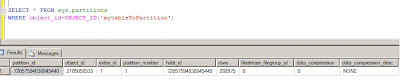
8. Move table to partition based on LastUpdated column of the table.
To perform this, I need to drop the index and recreate it on partition scheme that I have created above.
Just by creating my clustered index on partition scheme moved all the data in their respective partition. see result set below.
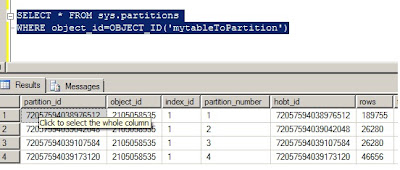
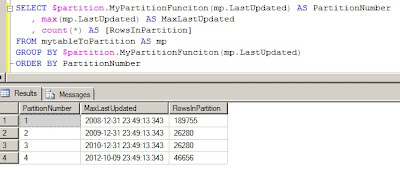
Let us now see where the our data has gone. The following query will show us the Maximum lastupdated value in particular partition, partition number and total number of rows in each partition. See the output result below.
In part II, I will show how easy it is to move archived data and able to delete without affecting performance of your system.
You don't need to do step 1 to 4 when the database and table/data exists. This is for demo and completeness purposes. You can directly jump to step 5
1.Create database
CREATE DATABASE MyPartitionDB
2. Create table
CREATE TABLE mytableToPartition(MyId INT IDENTITY(1,1), LastUpdated datetime)
3. Populate sample data
declare @timedate datetime
set @timedate = DATEADD(YEAR, -10, GETDATE())
while @timedate < '20121010'
begin
INSERT INTO mytableToPartition (LastUpdated)
values (@timedate)
set @timedate = DATEADD(MINUTE, 20, @timedate)
end
4. Create Index on existing table
CREATE clustered index CL_MyId on mytableToPartition(MyId)
The idea is to move all the data that is created before 2009 as archive and the others as one year partition. Effectively
< 1 Jan 2009
Jan 1 2009 to 31 Dec 2009
Jan 1 2010 to 31 Dec 2010
>= Jan 1 2011
Which means we will have four partitions.
5. Create Filegroups and add file to each Filegroup. For demo purpose I added only one file per Filegroup. As you can see below I created four Filegroups. One Filegroup for each partition. But, you don't have to create four Filegroups. You can use only one Filegroup for all partition but it is better for maintenance purposes and if you want move one Filegroup to different spindle it make it much easier.
ALTER DATABASE MyPartitionDB ADD FILEGROUP FG1;
ALTER DATABASE MyPartitionDB ADD FILEGROUP FG2;
ALTER DATABASE MyPartitionDB ADD FILEGROUP FG3;
ALTER DATABASE MyPartitionDB ADD FILEGROUP FG4;
-- now add file to each filegroup
ALTER DATABASE MyPartitionDBADD FILE(name='FG1',FILENAME='C:\temp\fg1.ndf') TO FILEGROUP FG1
ALTER DATABASE MyPartitionDB ADD FILE(name='FG2',FILENAME='C:\temp\fg2.ndf') TO FILEGROUP FG2
ALTER DATABASE MyPartitionDB ADD FILE(name='FG3',FILENAME='C:\temp\fg3.ndf') TO FILEGROUP FG3
ALTER DATABASE MyPartitionDB ADD FILE(name='FG4',FILENAME='C:\temp\fg4.ndf') TO FILEGROUP FG4
6. Create partition function and scheme
GO
-- create partition function
CREATE PARTITION FUNCTION MyPartitionFunciton (datetime)
AS RANGE RIGHT FOR VALUES ('20090101', '20100101', '20110101');
GO
-- create partition scheme
CREATE PARTITION SCHEME MypartitionScheme
AS PARTITION MyPartitionFunciton TO (FG1,FG2,FG3,FG4)
GO
7. See current status of our table. Up to now our table is in a default partition. See figure below.

8. Move table to partition based on LastUpdated column of the table.
To perform this, I need to drop the index and recreate it on partition scheme that I have created above.
-- drop existing index
DROP INDEX mytableToPartition.CL_MYID
-- re-create index on the partitionscheme
go
CREATE CLUSTERED INDEX CL_MYID on mytableToPartition(myid) on MypartitionScheme(run_date)
Just by creating my clustered index on partition scheme moved all the data in their respective partition. see result set below.

Let us now see where the our data has gone. The following query will show us the Maximum lastupdated value in particular partition, partition number and total number of rows in each partition. See the output result below.

In part II, I will show how easy it is to move archived data and able to delete without affecting performance of your system.
Monday, October 10, 2011
Why going back to ODBC?
Yes, that is my question. For the last few years Microsoft was pushing for OLE DB connectivity. Now, microsoft is going to phase out support for OLE DB. The main reason that have been given is portability. Well, why moved from ODBC in the first place. It is also mentioned on the article that the last OLE DB supported database is the next release of SQL Server (Denali). Microsoft have given a timeline when everybody should port thier application to ODBC 7 years. I am not sure why this move is a must. If it does work, why break and create hasle for the microsoft community who have adopted OLE DB?
Thursday, October 06, 2011
Transfer sql server logins between different versions
A very good kb from Microsoft that helps to transfer login between earlier version of SQL Server (7.0 and 2000) to new version. The script and full implication can be found @ Transfer SQL Server logins
Tuesday, August 09, 2011
SQL Server Trace flags
A very comprehensive list of SQL Server trace flags have been put together by Yusuf Anis on SQL Server Trace flag. A good starting point and reference for trace flag,
Wednesday, August 03, 2011
SQL Server vs Oracle
It is a question that has been asked over and over.don't think it will go away any soon. You get different answers from different experts. I learned that generalization is wrong when comparing different RDMS.
There has been many study conducted to clarify the differences. The more you read the more you are convinced that the word it depends will come to your head. I am as confused as you are but want to share another study by Alinean @ Oracle vs SQL Server.
I would love to hear your views !!!!!!!!!!
There has been many study conducted to clarify the differences. The more you read the more you are convinced that the word it depends will come to your head. I am as confused as you are but want to share another study by Alinean @ Oracle vs SQL Server.
I would love to hear your views !!!!!!!!!!
Saturday, July 16, 2011
SQL Server Code Name "Denali" CTP3
The new SQL Server CTP3 has arrived and it is time to play with the new features.
Tuesday, April 19, 2011
SQL Server 2008 R2 for Experienced Oracle DBA
The first course on SQL Server 2008 R2 for Oracle DBA's held in London. This course is very useful not only for Oracle DBA's but also for SQL Server DBA's who want to understand a bit of Oracle database. During a five day course I have been asked many questions from the delegates and it was one of the rewarding experience. This type of course doesn't come so often to UK and I had delegates from all over UK and two delegates from Poland. I recommend anybody who want to learn about SQL Server to attend this course. It is not because I run the course but I genuinely believe it is time and money well spent. The feedback from the delegate was amazing. If you want to read at your own time you can buy the book @SQL Server 2008 for Oracle DBA
Wednesday, March 16, 2011
It is not funny
It is always good to research before trying out. Windows 7 64-bit does not recognize 64-bit CPU in Virtual PC.
Monday, March 07, 2011
SQL Server compound statment operator support?
compound assignment operators. Here is a working example of those operators:
declare @i int
set @i = 100
/**************************
Addition and assignment
***************************/
set @i += 1
select @i
———–
101
/**************************
Subtraction and assignment
***************************/
set @i -= 1
select @i
———–
100
/**************************
Multiplication and assignment
***************************/
set @i *= 2
select @i
———–
200
/**************************
Division and assignment
***************************/
set @i /= 2
select @i
———–
100
/**************************
Addition and assignment
***************************/
set @i %= 3
select @i
———–
1
/**************************
xor operation and assignment
***************************/
set @i ^= 2
select @i
———–
3
/**************************
Bitwise & operation and assignment
***************************/
set @i &= 2
select @i
———–
2
/**************************
Bitwise | operation and assignment
***************************/
set @i |= 2
select @i
———–
2
declare @i int
set @i = 100
/**************************
Addition and assignment
***************************/
set @i += 1
select @i
———–
101
/**************************
Subtraction and assignment
***************************/
set @i -= 1
select @i
———–
100
/**************************
Multiplication and assignment
***************************/
set @i *= 2
select @i
———–
200
/**************************
Division and assignment
***************************/
set @i /= 2
select @i
———–
100
/**************************
Addition and assignment
***************************/
set @i %= 3
select @i
———–
1
/**************************
xor operation and assignment
***************************/
set @i ^= 2
select @i
———–
3
/**************************
Bitwise & operation and assignment
***************************/
set @i &= 2
select @i
———–
2
/**************************
Bitwise | operation and assignment
***************************/
set @i |= 2
select @i
———–
2
using SQL Server strongly typed table variable
The following code is an illustration of how to use strongly typed table variable.
1. create type
create type typ as table (id int);
2. create table
create table temp(id int not null)
3. create procedure
create procedure myproc
@t typ readonly
as
insert into temp
select * from @t typ
4. run
declare @mytype typ
insert into @mytype values(1), (2), (3)
exec myproc @mytype
1. create type
create type typ as table (id int);
2. create table
create table temp(id int not null)
3. create procedure
create procedure myproc
@t typ readonly
as
insert into temp
select * from @t typ
4. run
declare @mytype typ
insert into @mytype values(1), (2), (3)
exec myproc @mytype
Microsoft Secure Cloud Service for SQL Server Deployments
Microsoft just released a configuration assessment cloud service that helps to check your SQL Server configration deployments and enable DBA's proactively avoid configration problems. But for the tool to work it needs to be installed on Windows server box. So, if you want to play with it then you need a server. It will install both gateway and agent. But you only required to install agent if you don't need it to monitor SQL Server 2008.
To download the new tool or read more you can Read about atlanta (Cloud sql config)
I definately wouldn't put this product on produciton server but can check on my development and test servers to check if the configration is right. The tool collects all configration information and uploads to microsoft portal.
First preview of the portal is shown below.

To download the new tool or read more you can Read about atlanta (Cloud sql config)
I definately wouldn't put this product on produciton server but can check on my development and test servers to check if the configration is right. The tool collects all configration information and uploads to microsoft portal.
First preview of the portal is shown below.

Wednesday, February 23, 2011
Table Parameters and Table Types
A new feature in SQL 2008 is table-valued parameters. You can pass a table variable as a parameter to a stored procedure. When you create your procedure, you don't put the table definition directly in the parameter list of the procedure, instead you first have to create a table type, and use that in the procedure definition. At first glance it may seem like step of extra work, but when you think of it, it makes very much sense: you will need to declare the table in at least two places, in the caller and in the callee. So why not have the definition in one place?
Here is a quick example that illustrates how you do it:
CREATE TYPE my_table_type AS TABLE(a int NOT NULL,
b int NOT NULL)
go
CREATE PROCEDURE the_callee @indata my_table_type READONLY AS
INSERT targettable (col1, col2)
SELECT a, b FROM @indata
go
CREATE PROCEDURE the_caller AS
DECLARE @data my_table_type
INSERT @data (a, b)
VALUES (5, 7)
EXEC the_callee @data
go
So this is the final solution that makes everything else I've talked of in this article of academic interest? Unfortunately, it's the other way round. See that word READONLY in the procedure definition? That word is compulsory with a table parameter. That is, table parameters are for input only, and you cannot use them to get data back. There are of course when input-only tables are of use, but most of the time I share a temp table or use a process-keyed table it's for input-output or output-only.
Here is a quick example that illustrates how you do it:
CREATE TYPE my_table_type AS TABLE(a int NOT NULL,
b int NOT NULL)
go
CREATE PROCEDURE the_callee @indata my_table_type READONLY AS
INSERT targettable (col1, col2)
SELECT a, b FROM @indata
go
CREATE PROCEDURE the_caller AS
DECLARE @data my_table_type
INSERT @data (a, b)
VALUES (5, 7)
EXEC the_callee @data
go
So this is the final solution that makes everything else I've talked of in this article of academic interest? Unfortunately, it's the other way round. See that word READONLY in the procedure definition? That word is compulsory with a table parameter. That is, table parameters are for input only, and you cannot use them to get data back. There are of course when input-only tables are of use, but most of the time I share a temp table or use a process-keyed table it's for input-output or output-only.
Using the cursor Data Type in an OUTPUT Parameter
Thursday, February 17, 2011
What is New in SQL Server "Denali" (part II)
1. Encryption
SQL Server 2008 R2 supports MD2, MD4, MD5, SHA, or SHA1 hash algorithms for encryption of you data. The new release add support for SHA2_256 and SHA2_512 algorithms. You can use HASHBYTES function as previous version.
2. User defined server role
One of the new security features added to Denali is the ability for user now to add user defined server roles which wasn't possible in the previous versions. User can now create, drop, alter user defined server roles.
3. SQL server security model
Users don't require logins when access to contained database is permitted. This is a big change and an area that needs to be looked at properly. To understand how this is implemented you can get more info Designing and Implementing a Contained Database
4. New permission
Due to the addition of user defined server role, there are also associated permission. Permission to grant, deny and revoke on user defined server roles.
SQL Server 2008 R2 supports MD2, MD4, MD5, SHA, or SHA1 hash algorithms for encryption of you data. The new release add support for SHA2_256 and SHA2_512 algorithms. You can use HASHBYTES function as previous version.
2. User defined server role
One of the new security features added to Denali is the ability for user now to add user defined server roles which wasn't possible in the previous versions. User can now create, drop, alter user defined server roles.
3. SQL server security model
Users don't require logins when access to contained database is permitted. This is a big change and an area that needs to be looked at properly. To understand how this is implemented you can get more info Designing and Implementing a Contained Database
4. New permission
Due to the addition of user defined server role, there are also associated permission. Permission to grant, deny and revoke on user defined server roles.
Monday, February 14, 2011
What is New in SQL Server "Denali" (part I)
Part I : Availability and manageability Enhancements
As we all know microsoft is working on the next generation of SQL Server called Denali. It is at early stages to say what will be released but I would like to go through some of the features.
1. HADR
The introduction of the "HADR" solution for enhancing availability of user databases in an enterprise environment. This new enhancement of the database engine will help database administrators to enable to maximize availability for one or more of your user databases. HADR is a high-availability and disaster-recovery solution that provides an enterprise-level alternative to database mirroring. For more information , overview and to deploy, configure and administer HADR please refer to HADR
2.Combination of BIDS and Management studio
As we all know SQL Server managment studio was a one stop shop for your SQL server development and administation. The same is also true of Business Intellegence development studio (BIDS). The new version of SQL server will combine the two studio into one IDE. I think this is pretty cool.
3.Column-Based Query Accelerator
Column-Based Query Accelerator will help dramatically increase query performance ~10x as per microsoft's claim. I will probably test if this statement is true and will post my results on this blog. Colum base query accelerator will reduce performance tuning through interactive experiences with data for near instant response times and streamlined setup which removes the need to build summary aggregates.
4.SQL Server Management Studio enhancements
The Database EngineQuery Editor introduces enhanced functionality for Transact-SQL debugging and IntelliSense. Ability to debug T-SQL running on SQL2005 SP2 and later,
The Watch window and Quick Watch can now be used to watch T-SQL expressions,
Moving your cursor over T-SQ identifier will bring up a quick info pop up that displays the name of the expression and its value are just few of many new features that has been introduced in the next version of SQL Server
5. PowerShell
Windows powershell is no more part of the SQL server installation but it is part of pre-requisite. I am not sure if this is considered to be a new feature but nice to know.
6.Contained Databases
In new version of SQL server when moving a database from one instance of database engine to another instance, the dependancy of users in a contained database no longer associated with the logins on the instance. Microsoft claims that many other depenpendencies on the instance is also removed. For more info on contained database and the terms @read more on contained database
7. Database engine start-up options
Database start up option is now configured from SQL server configration manager.
As we all know microsoft is working on the next generation of SQL Server called Denali. It is at early stages to say what will be released but I would like to go through some of the features.
1. HADR
The introduction of the "HADR" solution for enhancing availability of user databases in an enterprise environment. This new enhancement of the database engine will help database administrators to enable to maximize availability for one or more of your user databases. HADR is a high-availability and disaster-recovery solution that provides an enterprise-level alternative to database mirroring. For more information , overview and to deploy, configure and administer HADR please refer to HADR
2.Combination of BIDS and Management studio
As we all know SQL Server managment studio was a one stop shop for your SQL server development and administation. The same is also true of Business Intellegence development studio (BIDS). The new version of SQL server will combine the two studio into one IDE. I think this is pretty cool.
3.Column-Based Query Accelerator
Column-Based Query Accelerator will help dramatically increase query performance ~10x as per microsoft's claim. I will probably test if this statement is true and will post my results on this blog. Colum base query accelerator will reduce performance tuning through interactive experiences with data for near instant response times and streamlined setup which removes the need to build summary aggregates.
4.SQL Server Management Studio enhancements
The Database EngineQuery Editor introduces enhanced functionality for Transact-SQL debugging and IntelliSense. Ability to debug T-SQL running on SQL2005 SP2 and later,
The Watch window and Quick Watch can now be used to watch T-SQL expressions,
Moving your cursor over T-SQ identifier will bring up a quick info pop up that displays the name of the expression and its value are just few of many new features that has been introduced in the next version of SQL Server
5. PowerShell
Windows powershell is no more part of the SQL server installation but it is part of pre-requisite. I am not sure if this is considered to be a new feature but nice to know.
6.Contained Databases
In new version of SQL server when moving a database from one instance of database engine to another instance, the dependancy of users in a contained database no longer associated with the logins on the instance. Microsoft claims that many other depenpendencies on the instance is also removed. For more info on contained database and the terms @read more on contained database
7. Database engine start-up options
Database start up option is now configured from SQL server configration manager.
Thursday, May 13, 2010
Install SQL server R2 issue
Today I faced with the following error while trying to install SQL server 2008 R2.
Sql2005SsmsExpressFacet:Checks whether SQL Server 2005 Express Tools are installed. FailedThe SQL Server 2005 Express Tools are installed. To continue, remove the SQL Server 2005 Express Tools.
I checked and there was no installation of SQL server express edition.
I then started looking at the registery and the only thing I need to do was to rename one entry in registry. Find shellSEM in the registery and rename it
The full path of the registry location is
HKEY_LOCAL_MACHINE\Software\Microsoft\Microsoft SQL Server\90\Tools\ShellSEM
Sql2005SsmsExpressFacet:Checks whether SQL Server 2005 Express Tools are installed. FailedThe SQL Server 2005 Express Tools are installed. To continue, remove the SQL Server 2005 Express Tools.
I checked and there was no installation of SQL server express edition.
I then started looking at the registery and the only thing I need to do was to rename one entry in registry. Find shellSEM in the registery and rename it
The full path of the registry location is
HKEY_LOCAL_MACHINE\Software\Microsoft\Microsoft SQL Server\90\Tools\ShellSEM
Subscribe to:
Posts (Atom)