One of the new features introduced on SQL server 2012 was a memory optimized columnstore index. This feature not only reduces the amount of storage but also the speed of the query. During my test, I found that the speed of a query performance before and after columnstore index was in magnitude of 15 times faster. Wow, that was very impressive. As being new feature it have its own drawbacks. You are not able to update the data, hum. The workaround was very cumbersome and not suitable for some of data warehouse solutions. If you want to update data you need to drop the columnstore index update the data and recreate it.
If you have already upgraded to 2012 to make use of the columnstore index then you may have to upgrade to the new SQL server 2014. SQL 2014 doesn’t require the workaround of updating data. The new release enhanced the columnstore to be a pure columnar store. Bang on!!
Data warehouse is much happier place to be with SQL 2014. Not only you will be able to save space but also increase query performance.
Wednesday, August 28, 2013


Thursday, August 22, 2013
When is SQL server installed
I have been asked may times how to find when a SQL server is installed. Mostly I told them to find the installation log. But, what I didn't realized is that you can find out by querying sys.syslogin database.To my surprise, quiet an easy statement. You can use
SELECT createdate as Sql_Server_Install_Date, *
FROM sys.syslogins
where sid = 0x010100000000000512000000
FROM sys.syslogins
where sid = 0x010100000000000512000000
or
SELECT createdate as Sql_Server_Install_Date
FROM sys.syslogins
where loginname = 'NT AUTHORITY\SYSTEM'
FROM sys.syslogins
where loginname = 'NT AUTHORITY\SYSTEM'
One of the above will do as long as default language is English
Flushing the cache for one database
DECLARE @DBID int
SET @DBID = ( SELECT dbid FROM master.dbo.sysdatabases WHERE name = 'db')
--Flush procedure on the db
DBCC FLUSHPROCINDB (@intDBID)
SET @DBID = ( SELECT dbid FROM master.dbo.sysdatabases WHERE name = 'db')
--Flush procedure on the db
DBCC FLUSHPROCINDB (@intDBID)
Friday, May 17, 2013
Execution plan puzzle
I recently come accross a query that used to run fine on production server but suddenly
Execution plans can be affected by different statistics, parallelism due to number of processors, the amount of available RAM in the server, different service packs, different server configuration settings, and the current load on the server. I imagine one or more of these are causing what you are seeing.
Friday, May 11, 2012
SQL server system table corruption
Recently I came across a sage database that has been corrupted. When running DBCC CHECKDB command I was getting the following errors:
There are 226 rows in 1 pages
for object "sys.sysprivs".
DBCC results for
'sys.sysschobjs'.
Msg 2511, Level 16, State 1,
Line 1
Table error: Object ID 34,
index ID 2, partition ID 562949955649536, alloc unit ID 562949955649536 (type
In-row data). Keys out of order on page (1:47), slots 66 and 67.
Msg 2511, Level 16, State 1,
Line 1
Table error: Object ID 34,
index ID 2, partition ID 562949955649536, alloc unit ID 562949955649536 (type
In-row data). Keys out of order on page (1:47), slots 72 and 73.
Msg 2511, Level 16, State 1,
Line 1
Table error: Object ID 34,
index ID 2, partition ID 562949955649536, alloc unit ID 562949955649536 (type
In-row data). Keys out of order on page (1:47), slots 93 and 94.
There are 4147 rows in 93
pages for object "sys.sysschobjs".
CHECKDB found 0 allocation
errors and 3 consistency errors in table 'sys.sysschobjs' (object ID 34).
Normally the re-indexing should have fixed this type of issue when the base table is user table but it didn't. To fix the issue I have to perform the following commands
use DatabaseName
go
ALTER DATABASE DatabaseName
SET SINGLE_USER
go
DBCC CHECKDB('DatabaseName', REPAIR_REBUILD)
go
The outcome from the above command was
Repair: The Nonclustered
index successfully rebuilt for the object "sys.sysschobjs, nc1" in
database "FCE_Sage".
Msg 8945, Level 16, State 1,
Line 1
Table error: Object ID 34,
index ID 2 will be rebuilt.
The error has been repaired.
Msg 2511, Level 16, State 1,
Line 1
Table error: Object ID 34,
index ID 2, partition ID 562949955649536, alloc unit ID 562949955649536 (type
In-row data). Keys out of order on page (1:47), slots 66 and 67.
The error has been repaired.
Msg 2511, Level 16, State 1,
Line 1
Table error: Object ID 34,
index ID 2, partition ID 562949955649536, alloc unit ID 562949955649536 (type
In-row data). Keys out of order on page (1:47), slots 72 and 73.
The error has been repaired.
Msg 2511, Level 16, State 1,
Line 1
Table error: Object ID 34,
index ID 2, partition ID 562949955649536, alloc unit ID 562949955649536 (type
In-row data). Keys out of order on page (1:47), slots 93 and 94.
The error has been repaired..
Tuesday, April 24, 2012
Latest version of SQL server
To get an idea of what the latest version of SQL server will be, you can ask a SQL guru @Ask SQL Guru
Cannot shrink tempdb
How to shrink tempDB
SELECT * FROM sys.dm_exec_requests WHERE database_id = 2
select * from sys.dm_tran_locks
where resource_database_id= 2
select * from sys.dm_db_session_space_usage
where user_objects_alloc_page_count<> 0
SELECT * FROM sys.all_objects
where is_ms_shipped = 0
DBCC FREEPROCCACHE
BCC SHRINKFILE ('tempdev', 1024)
Purge all data in database
Recently I have been tasked to purge all data in the database. When trying to delete data from tables which have foreign key relationship the standard purge routine will fail or you have to spend time to get which table to purge first. Also there is an issue of identity as when you delete data from the table the identity will not go back to starting point. After few research, I have got the best method which is shown below.
1. Disable all constraints in the database using the following command
exec sp_msforeachtable "ALTER TABLE ? nocheck contraint all"
2. Delete all data in the database
exec sp_MSForEachTable "DELETE FROM ?"
3. Enable all constraints
exec sp_msforeachtable "ALTER TABLE ? WITH CHECK CHECK CONSTRAINT all"
4. Reset tables with identity. Note when you run the following it will give you error if the table doesn't have identity column. Ignore the errors.
exec sp_MSforeachtable "DBCC CHECKIDENT ( '?', RESEED, 0)"
Friday, January 27, 2012
SQL server 2012 lauch date
New version of SQL server 2012 launch date is set for 7th of March. The offering will be in three main edition. Details of edition feature comparison can be found at Feature comparison
Enterprise Edition (EE) will be licensed based on compute capacity measured in cores
Business Intelligence (BI) Edition will be available in the Server + CAL model, based on users or devices
Standard Edition (SE) offers both licensing models to address basic database workloads
There will be Web Developer and Express versions but this is not detailed enough and we just have to wait and see.
SQL Server 2012 will continue to offer two licensing options one is based on
one based on computing power and the other is based on based on users or devices. The way the power is measured is not processor rather core based.
There will be Web Developer and Express versions but this is not detailed enough and we just have to wait and see.
SQL Server 2012 will continue to offer two licensing options one is based on
one based on computing power and the other is based on based on users or devices. The way the power is measured is not processor rather core based.
Friday, October 14, 2011
Partitioning an existing table and archiving part I
Recently, I have been tasked to come up with a solution to partition a table with clustered index. Previously, I have setup partition from scratch and was loading data to the new partition from non-partitioned table. When a table that you want partition have got a clustered index the job is much easier. I have followed the following steps to achieve my goal.
You don't need to do step 1 to 4 when the database and table/data exists. This is for demo and completeness purposes. You can directly jump to step 5
1.Create database
2. Create table
3. Populate sample data
4. Create Index on existing table
The idea is to move all the data that is created before 2009 as archive and the others as one year partition. Effectively
< 1 Jan 2009
Jan 1 2009 to 31 Dec 2009
Jan 1 2010 to 31 Dec 2010
>= Jan 1 2011
Which means we will have four partitions.
5. Create Filegroups and add file to each Filegroup. For demo purpose I added only one file per Filegroup. As you can see below I created four Filegroups. One Filegroup for each partition. But, you don't have to create four Filegroups. You can use only one Filegroup for all partition but it is better for maintenance purposes and if you want move one Filegroup to different spindle it make it much easier.
6. Create partition function and scheme
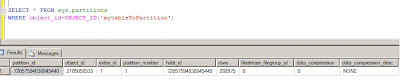
7. See current status of our table. Up to now our table is in a default partition. See figure below.
8. Move table to partition based on LastUpdated column of the table.
To perform this, I need to drop the index and recreate it on partition scheme that I have created above.
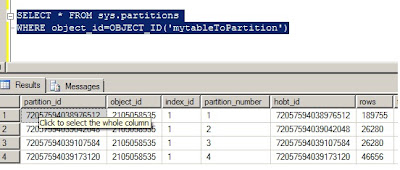
Just by creating my clustered index on partition scheme moved all the data in their respective partition. see result set below.
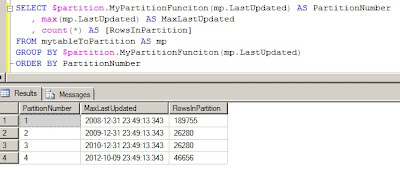
Let us now see where the our data has gone. The following query will show us the Maximum lastupdated value in particular partition, partition number and total number of rows in each partition. See the output result below.
In part II, I will show how easy it is to move archived data and able to delete without affecting performance of your system.
You don't need to do step 1 to 4 when the database and table/data exists. This is for demo and completeness purposes. You can directly jump to step 5
1.Create database
CREATE DATABASE MyPartitionDB
2. Create table
CREATE TABLE mytableToPartition(MyId INT IDENTITY(1,1), LastUpdated datetime)
3. Populate sample data
declare @timedate datetime
set @timedate = DATEADD(YEAR, -10, GETDATE())
while @timedate < '20121010'
begin
INSERT INTO mytableToPartition (LastUpdated)
values (@timedate)
set @timedate = DATEADD(MINUTE, 20, @timedate)
end
4. Create Index on existing table
CREATE clustered index CL_MyId on mytableToPartition(MyId)
The idea is to move all the data that is created before 2009 as archive and the others as one year partition. Effectively
< 1 Jan 2009
Jan 1 2009 to 31 Dec 2009
Jan 1 2010 to 31 Dec 2010
>= Jan 1 2011
Which means we will have four partitions.
5. Create Filegroups and add file to each Filegroup. For demo purpose I added only one file per Filegroup. As you can see below I created four Filegroups. One Filegroup for each partition. But, you don't have to create four Filegroups. You can use only one Filegroup for all partition but it is better for maintenance purposes and if you want move one Filegroup to different spindle it make it much easier.
ALTER DATABASE MyPartitionDB ADD FILEGROUP FG1;
ALTER DATABASE MyPartitionDB ADD FILEGROUP FG2;
ALTER DATABASE MyPartitionDB ADD FILEGROUP FG3;
ALTER DATABASE MyPartitionDB ADD FILEGROUP FG4;
-- now add file to each filegroup
ALTER DATABASE MyPartitionDBADD FILE(name='FG1',FILENAME='C:\temp\fg1.ndf') TO FILEGROUP FG1
ALTER DATABASE MyPartitionDB ADD FILE(name='FG2',FILENAME='C:\temp\fg2.ndf') TO FILEGROUP FG2
ALTER DATABASE MyPartitionDB ADD FILE(name='FG3',FILENAME='C:\temp\fg3.ndf') TO FILEGROUP FG3
ALTER DATABASE MyPartitionDB ADD FILE(name='FG4',FILENAME='C:\temp\fg4.ndf') TO FILEGROUP FG4
6. Create partition function and scheme
GO
-- create partition function
CREATE PARTITION FUNCTION MyPartitionFunciton (datetime)
AS RANGE RIGHT FOR VALUES ('20090101', '20100101', '20110101');
GO
-- create partition scheme
CREATE PARTITION SCHEME MypartitionScheme
AS PARTITION MyPartitionFunciton TO (FG1,FG2,FG3,FG4)
GO
7. See current status of our table. Up to now our table is in a default partition. See figure below.

8. Move table to partition based on LastUpdated column of the table.
To perform this, I need to drop the index and recreate it on partition scheme that I have created above.
-- drop existing index
DROP INDEX mytableToPartition.CL_MYID
-- re-create index on the partitionscheme
go
CREATE CLUSTERED INDEX CL_MYID on mytableToPartition(myid) on MypartitionScheme(run_date)
Just by creating my clustered index on partition scheme moved all the data in their respective partition. see result set below.

Let us now see where the our data has gone. The following query will show us the Maximum lastupdated value in particular partition, partition number and total number of rows in each partition. See the output result below.

In part II, I will show how easy it is to move archived data and able to delete without affecting performance of your system.
Monday, October 10, 2011
Why going back to ODBC?
Yes, that is my question. For the last few years Microsoft was pushing for OLE DB connectivity. Now, microsoft is going to phase out support for OLE DB. The main reason that have been given is portability. Well, why moved from ODBC in the first place. It is also mentioned on the article that the last OLE DB supported database is the next release of SQL Server (Denali). Microsoft have given a timeline when everybody should port thier application to ODBC 7 years. I am not sure why this move is a must. If it does work, why break and create hasle for the microsoft community who have adopted OLE DB?
Thursday, October 06, 2011
Transfer sql server logins between different versions
A very good kb from Microsoft that helps to transfer login between earlier version of SQL Server (7.0 and 2000) to new version. The script and full implication can be found @ Transfer SQL Server logins
Tuesday, August 09, 2011
SQL Server Trace flags
A very comprehensive list of SQL Server trace flags have been put together by Yusuf Anis on SQL Server Trace flag. A good starting point and reference for trace flag,
Wednesday, August 03, 2011
SQL Server vs Oracle
It is a question that has been asked over and over.don't think it will go away any soon. You get different answers from different experts. I learned that generalization is wrong when comparing different RDMS.
There has been many study conducted to clarify the differences. The more you read the more you are convinced that the word it depends will come to your head. I am as confused as you are but want to share another study by Alinean @ Oracle vs SQL Server.
I would love to hear your views !!!!!!!!!!
There has been many study conducted to clarify the differences. The more you read the more you are convinced that the word it depends will come to your head. I am as confused as you are but want to share another study by Alinean @ Oracle vs SQL Server.
I would love to hear your views !!!!!!!!!!
Saturday, July 16, 2011
SQL Server Code Name "Denali" CTP3
The new SQL Server CTP3 has arrived and it is time to play with the new features.
Tuesday, April 19, 2011
SQL Server 2008 R2 for Experienced Oracle DBA
The first course on SQL Server 2008 R2 for Oracle DBA's held in London. This course is very useful not only for Oracle DBA's but also for SQL Server DBA's who want to understand a bit of Oracle database. During a five day course I have been asked many questions from the delegates and it was one of the rewarding experience. This type of course doesn't come so often to UK and I had delegates from all over UK and two delegates from Poland. I recommend anybody who want to learn about SQL Server to attend this course. It is not because I run the course but I genuinely believe it is time and money well spent. The feedback from the delegate was amazing. If you want to read at your own time you can buy the book @SQL Server 2008 for Oracle DBA
Wednesday, March 16, 2011
It is not funny
It is always good to research before trying out. Windows 7 64-bit does not recognize 64-bit CPU in Virtual PC.
Monday, March 07, 2011
SQL Server compound statment operator support?
compound assignment operators. Here is a working example of those operators:
declare @i int
set @i = 100
/**************************
Addition and assignment
***************************/
set @i += 1
select @i
———–
101
/**************************
Subtraction and assignment
***************************/
set @i -= 1
select @i
———–
100
/**************************
Multiplication and assignment
***************************/
set @i *= 2
select @i
———–
200
/**************************
Division and assignment
***************************/
set @i /= 2
select @i
———–
100
/**************************
Addition and assignment
***************************/
set @i %= 3
select @i
———–
1
/**************************
xor operation and assignment
***************************/
set @i ^= 2
select @i
———–
3
/**************************
Bitwise & operation and assignment
***************************/
set @i &= 2
select @i
———–
2
/**************************
Bitwise | operation and assignment
***************************/
set @i |= 2
select @i
———–
2
declare @i int
set @i = 100
/**************************
Addition and assignment
***************************/
set @i += 1
select @i
———–
101
/**************************
Subtraction and assignment
***************************/
set @i -= 1
select @i
———–
100
/**************************
Multiplication and assignment
***************************/
set @i *= 2
select @i
———–
200
/**************************
Division and assignment
***************************/
set @i /= 2
select @i
———–
100
/**************************
Addition and assignment
***************************/
set @i %= 3
select @i
———–
1
/**************************
xor operation and assignment
***************************/
set @i ^= 2
select @i
———–
3
/**************************
Bitwise & operation and assignment
***************************/
set @i &= 2
select @i
———–
2
/**************************
Bitwise | operation and assignment
***************************/
set @i |= 2
select @i
———–
2
using SQL Server strongly typed table variable
The following code is an illustration of how to use strongly typed table variable.
1. create type
create type typ as table (id int);
2. create table
create table temp(id int not null)
3. create procedure
create procedure myproc
@t typ readonly
as
insert into temp
select * from @t typ
4. run
declare @mytype typ
insert into @mytype values(1), (2), (3)
exec myproc @mytype
1. create type
create type typ as table (id int);
2. create table
create table temp(id int not null)
3. create procedure
create procedure myproc
@t typ readonly
as
insert into temp
select * from @t typ
4. run
declare @mytype typ
insert into @mytype values(1), (2), (3)
exec myproc @mytype
Microsoft Secure Cloud Service for SQL Server Deployments
Microsoft just released a configuration assessment cloud service that helps to check your SQL Server configration deployments and enable DBA's proactively avoid configration problems. But for the tool to work it needs to be installed on Windows server box. So, if you want to play with it then you need a server. It will install both gateway and agent. But you only required to install agent if you don't need it to monitor SQL Server 2008.
To download the new tool or read more you can Read about atlanta (Cloud sql config)
I definately wouldn't put this product on produciton server but can check on my development and test servers to check if the configration is right. The tool collects all configration information and uploads to microsoft portal.
First preview of the portal is shown below.

To download the new tool or read more you can Read about atlanta (Cloud sql config)
I definately wouldn't put this product on produciton server but can check on my development and test servers to check if the configration is right. The tool collects all configration information and uploads to microsoft portal.
First preview of the portal is shown below.

Subscribe to:
Posts (Atom)